
The early May bank holiday in 2020 for the UK will move from Monday 4 May to Friday 8 May to mark the 75th anniversary of VE Day which takes place on 8 May.
The early May bank holiday in 2020 for the UK will move from Monday 4th May to Friday 8th May to mark the 75th anniversary of VE Day.The early May bank holiday in 2020 will move from Monday 4th May to Friday 8th May to mark the 75th anniversary of VE Day which takes place on 8 May, and enable people to pay tribute to those who served in one of the most significant events in our country's history, Business Secretary Greg Clark announced 7th June 2019. | 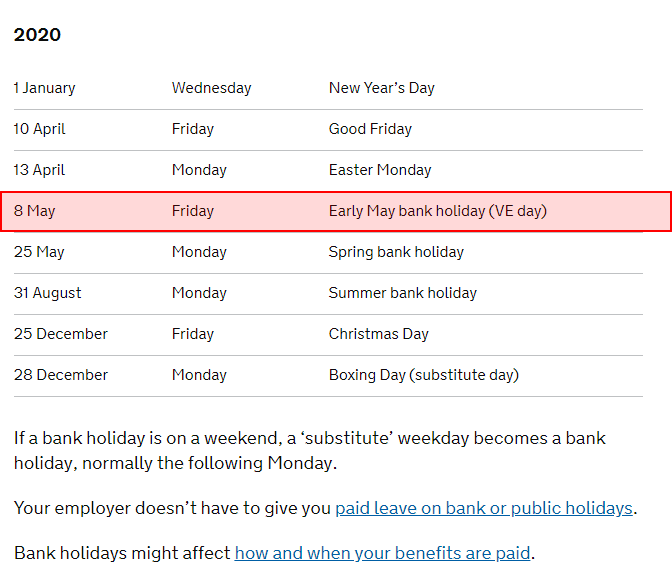 |
Does this affect me, where can I find out more?
2020 May bank holiday will be moved to mark 75th anniversary of VE Day
Do I need to do anything to my WhosOff account?
If you have already setup your bank holidays for 2020 it is advisable that you follow the steps below to ensure you have entered the bank holidays as per the UK Governments amended list. If you haven't imported the dates already then you will see the amended date when you import the bank holidays (Free Days) for 2020.
Ensure you have the right date listed in Free / Restricted Days
The first step is to make sure you have the right bank holidays in your account.
- Login to your WhosOff account
- From the Administration menu, select "Free / Restricted days" (right hand side)
- Use the on screen filtering to view Free / Restricted days for 2020.
- Check if you have entered the 4/May/2020, if so follow on:
- Delete the entry for the 4th May 2020
- Import or enter the 8th May 2020 using the form on the right hand side.
Check if leave has already been booked for this period
The next step is to check if anyone has already booked this time off, if so, you may have to re-submit the leave request to ensure the correct allowance is taken.
- Login to your WhosOff account
- Click on Reports (top right)
- Run a WhosOff report (top left), with the following selections:
- Leave Type: All Leave Types
- Decision: Any
- Date Range: Select Date Range (04.May.2020 - 10.May.2020)
- View: On Screen
- Report for: Company
- Group by staff member: No
- Selected Date Range Only: Yes
- If the above report produces any records of leave, you may have to follow these steps to re-submit the leave request to ensure the correct calculations have been taken:
Re-submit leave already entered across these dates
Follow these steps to re-submit any leave that may have taken into account the bank holidays prior to the UK Government change.
- Login to your WhosOff account.
- From the Administration menu, select Manage Staff (left hand side)
- Locate the staff member in question and click on Leave in line with their record.
- Find the leave entry that needs adjusting, click on the "Edit" link in line with the record.
- Without making any changes to the entry, click on the "Check Changes" button.
- The system will then inform you of how much allowance will be given back, then subsequently taken, taking into account the adjustments you may to the Bank Holidays (Free Days).
- Click on "Confirm Changes"
- Continue this process for any leave records that need checking/re-submitting from the report you ran earlier.
If you need any assistance, please do not hesitate to contact our support team on 01227 812933, or drop us an email at support@whosoff.com


Similar articles
07.SEP.2026
A spreadsheet is fine when there are five of you. It's less fine when requests are arriving by email, WhatsApp, and sticky note, and nobody's quite sure who's actually off next week. Here's a practical look at why leave admin hits small businesses harder than most, and how to know when it's time for something better than a shared spreadsheet.
24.AUG.2026
Leave management looks simple on paper - until three people request the same week off, your busiest month collides with a holiday rush, and someone resigns with ten days still owed. These situations aren't exceptions; they're what HR actually deals with every week. Here's a practical look at the most common leave scenarios, and how the right process (and the right software) stops each one from becoming a headache.
03.AUG.2026
Office-based leave management is easy - until your team isn't all in one office. Add remote workers, multiple sites, or a genuinely hybrid schedule, and "who's actually off this week?" stops being a simple question. Here's what to look for in leave management software built for distributed teams, and how to stop spreadsheets from quietly falling out of sync.
20.JUL.2026
Still juggling leave requests through email and a shared spreadsheet? You're not alone - but it's costing you more than you think. With so many leave management tools on the market, picking the right one isn't about finding the flashiest feature list. It's about finding software your team will actually use.