
Cyber Essentials Certified
GDPR Compliant
Crown Commercial Service Supplier
FREE iOS & Android Apps
FREE UK Phone & Email Support
No Long-Term Contracts
All the features your business needs, none of the complexity it doesn't
WhosOff covers the full employee lifecycle - from booking a day off to tracking training certifications. Every feature is connected, so your data is always consistent and your team never has to switch tools.
Leave Requests
Online leave booking and approval for your whole team, from any device.
Explore →Leave Policies
Enforce fair, consistent rules - carryover, restrictions, allowances and more.
Explore →Overtime & TOIL
Log extra hours, reward staff with time in lieu, and feed data to payroll.
Explore →Reporting & Analytics
Bradford Factor, leave trends, allowance summaries - exported to CSV/XLSX.
Mobile Apps
FREE iOS & Android apps so your team can manage leave anywhere, anytime
Explore →Integrations
Google Calendar, Outlook, SSO, API, webhooks - WhosOff fits your stack.
Explore →Security & Onboarding
MFA, SAML, SSO, role-based permissions, bulk import and first-class support.
Explore →Leave requests that actually work the way your business does
WhosOff replaces paper forms, email chains, and holiday spreadsheets with a fast, transparent online system. Staff book leave in seconds; managers approve it with full context. No chasing, no confusion.
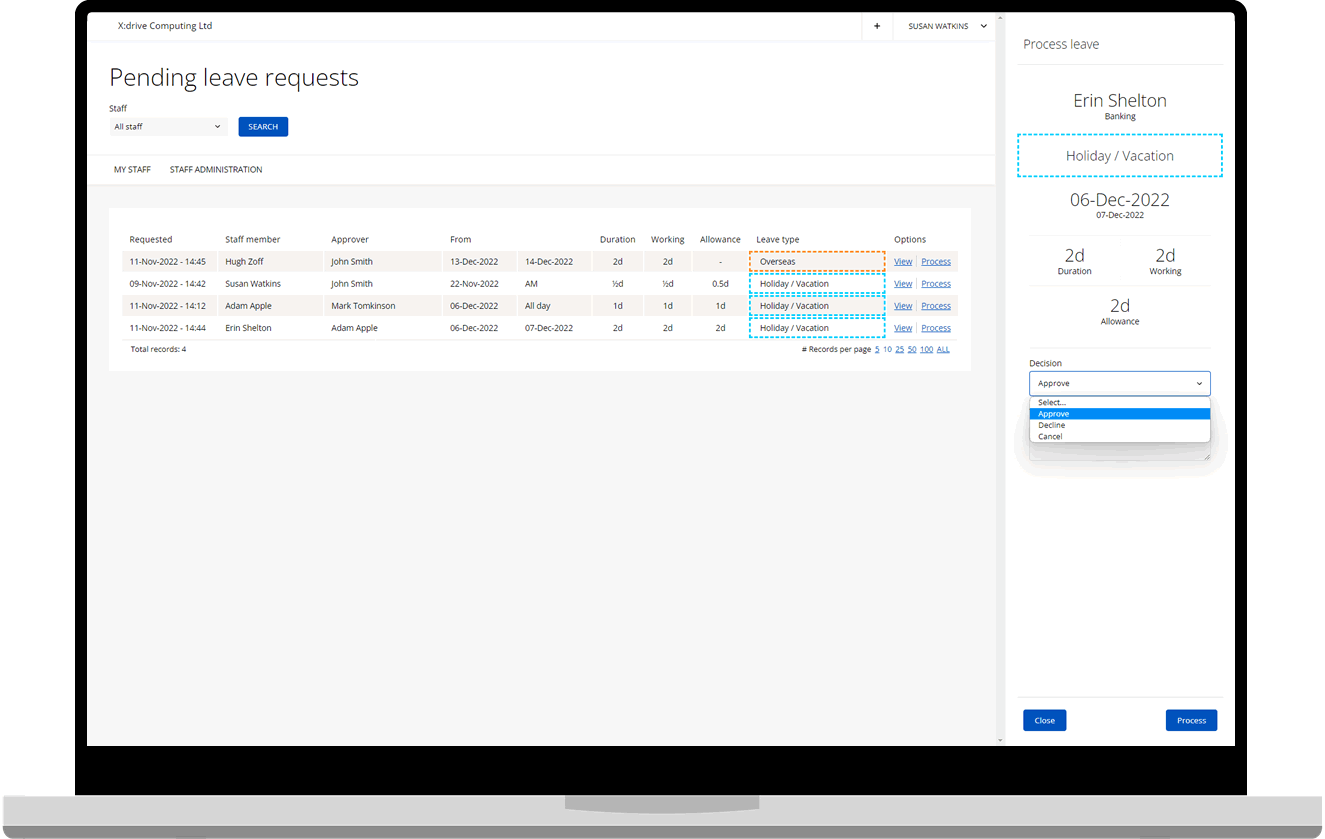
From request to approved - in a few clicks
Staff submit leave requests from any device; managers see the full team calendar, remaining allowances, and any approval rules before they decide. The whole process is tracked, timestamped, and auditable.
- Create unlimited custom leave types - holiday, WFH, training, medical, bereavement and more
- Set leave types to auto-approve for low-friction bookings like appointments or WFH days
- Staff can report a colleague's sick absence (up to one day) without manager involvement
- Block out public holidays or restricted dates to prevent conflicting bookings
- Super Users send gentle reminders to managers with outstanding approval queues
- Expired pending requests flagged automatically with approve-or-remove options
- Up to two additional notifiers per staff member - keep HR or a second manager in the loop
- Full audit trail of every request, decision, and who made it
Enforce your leave policies automatically - not manually
Inconsistent policy enforcement leads to conflict and coverage gaps. WhosOff bakes your rules into the system so they're applied every time, for everyone - no exceptions, no arguments.
Rules your team will actually follow - because they have to
Set minimum department staffing levels, carryover limits, notice periods, and staff-to-staff clash restrictions. WhosOff enforces them silently in the background every time a booking is made.
- Set how many staff can be off simultaneously per team
- Create staff-to-staff restrictions so key pairs can never clash on leave
- Configure carryover limits - max days allowed to roll into the next holiday year
- Yearly carryover tool automates the transfer process at year-end
- Set allowances per staff member and enforce them rigorously
- Block restricted days - public holidays, training days, peak trading periods
- Add bonus days for long service, manager benefits, or seniority rewards
- Investigate sick leave patterns with Bradford Factor reporting
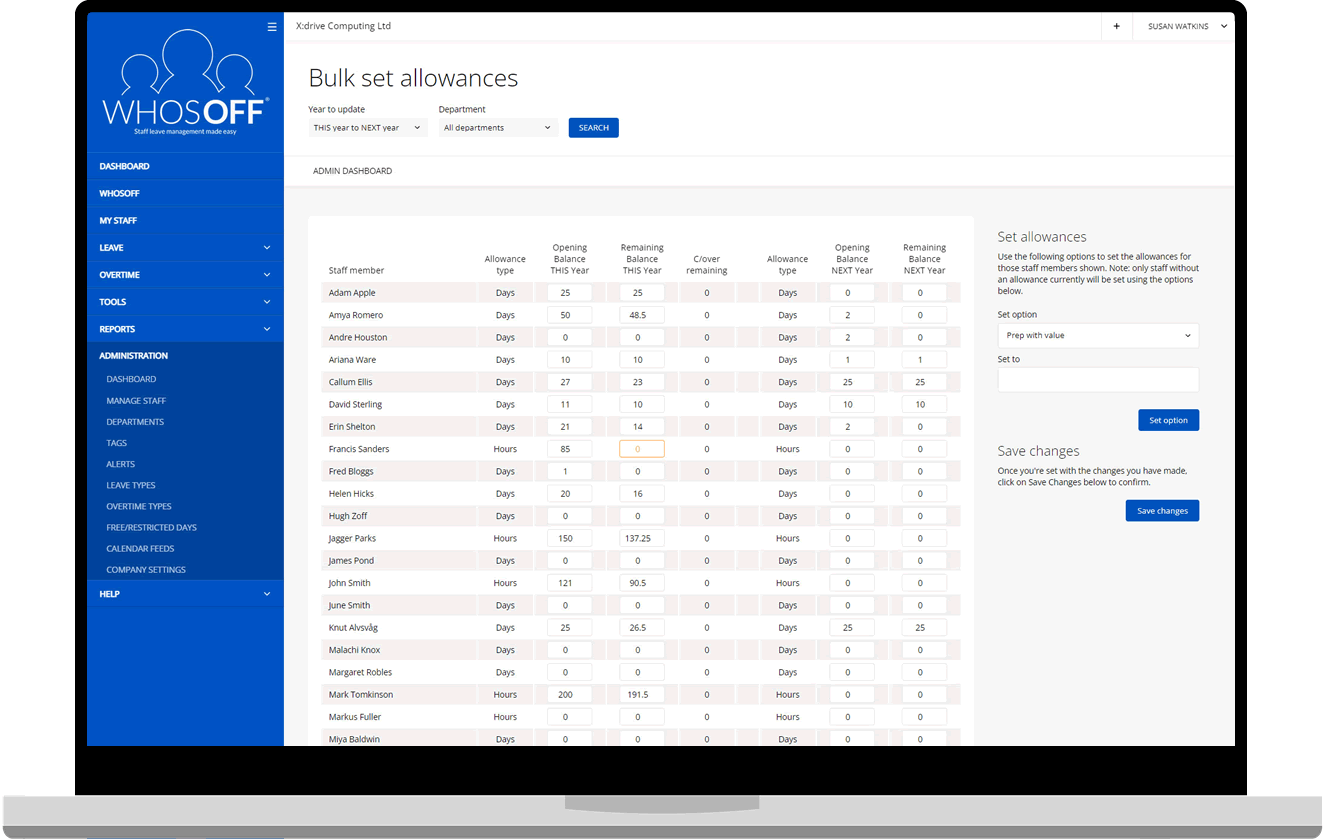
Track every extra hour - and reward it fairly
Staff who go above and beyond deserve to be recognised. WhosOff logs overtime as it's approved, displays TOIL separately from holiday, and generates payroll-ready reports - so no one's extra effort falls through the cracks.
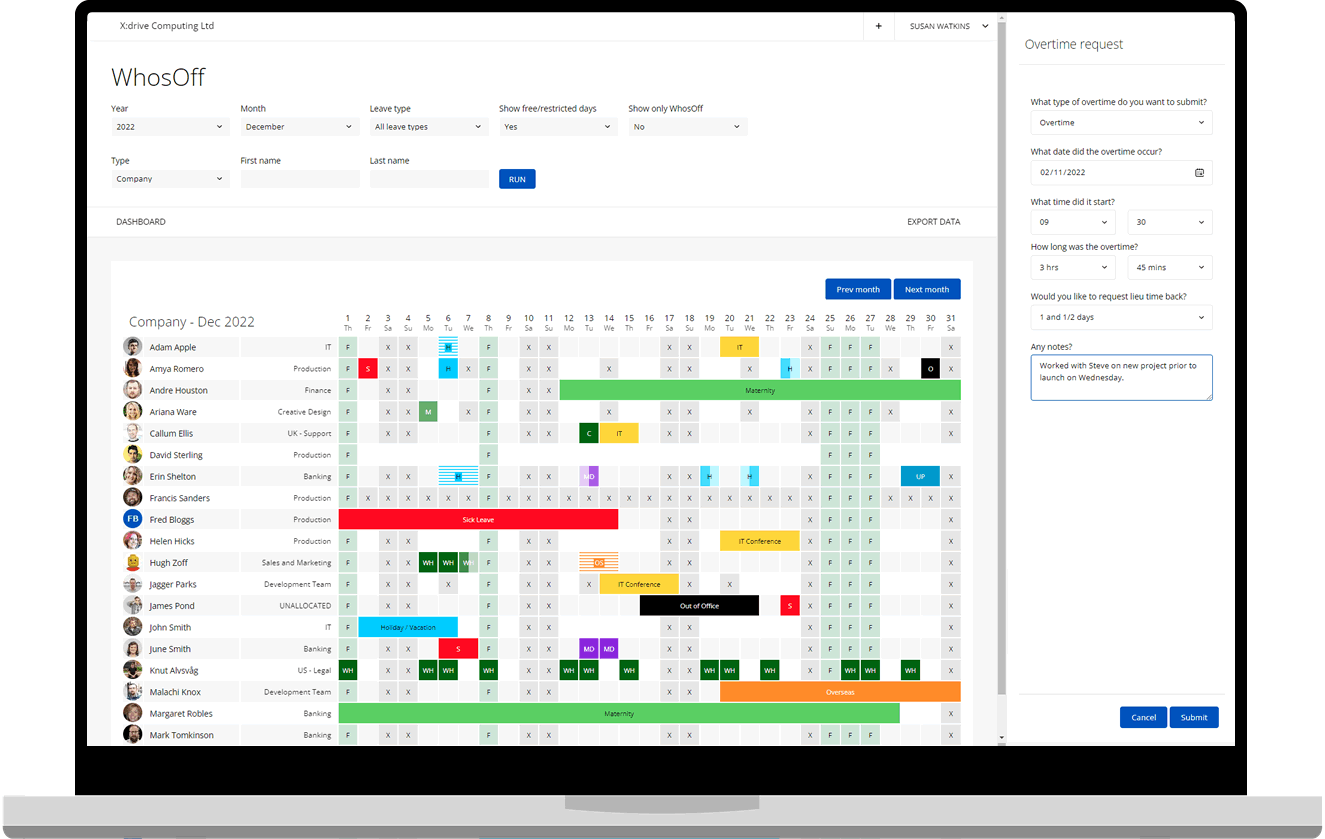
From late shifts to time in lieu - tracked automatically
Overtime works through the same intuitive flow as leave. Staff submit hours, managers approve, and TOIL balances update immediately - all visible from the dashboard without any manual calculation.
- Create custom overtime types - standard time, double time, weekend cover, on-call
- Offer time off in lieu (TOIL) instead of - or as well as - paid overtime
- TOIL balances shown separately from holiday allowances
- Managers can log overtime on behalf of staff from the administration area
- Conversion rate settings - 1:1 or enhanced rates (e.g. 1.5:1 for weekends)
- Export overtime reports to CSV/XLSX for payroll reconciliation
Your people data, all in one connected place
Staff Hub extends WhosOff from a leave tracker into a central home for everything you know about your team - employment history, salaries, certifications, contracts, policies, and emergency contacts. All connected to leave data, with no duplication.
More than records. A complete picture of your workforce.
Staff Hub is natively wired into leave, overtime, and absence data - so every corner of WhosOff talks to each other. Granular permissions mean each data type is controlled independently, down to the individual user.
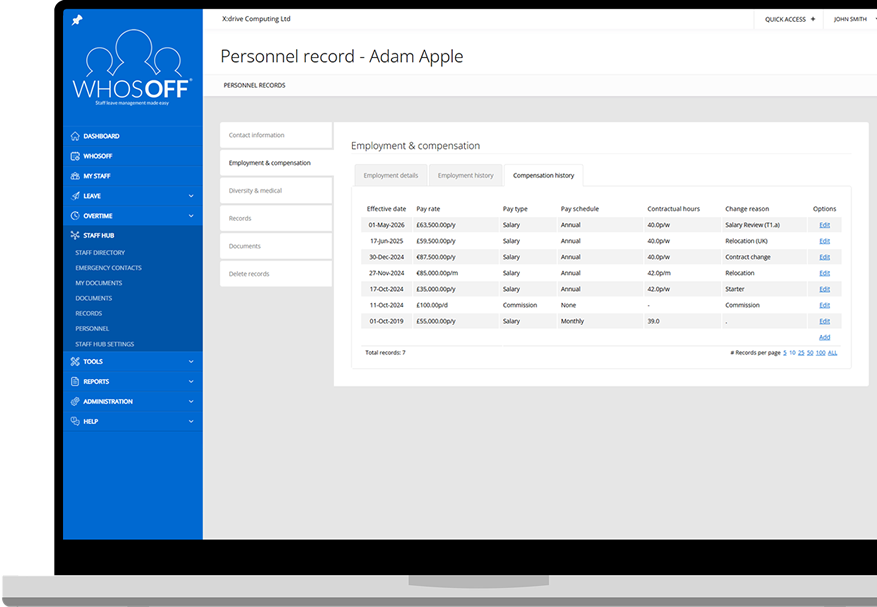
Employment & Salary History
Full compensation history - pay rate, type, contractual hours - with effective-from dates on every change.
Explore →Training & Certifications
Upload certificates against staff, set expiry dates, and receive alerts before anything lapses.
Explore →Document Storage & Compliance
Upload contracts, policies, and handbooks. Track read & acceptance receipts with deadline alerts.
Explore →Staff Directorty & Emergency Contacts
Searchable directory with permission controls. Staff manage their own emergency contacts via app.
Explore →The insight your HR team needs, without the manual work
WhosOff surfaces meaningful workforce data automatically - absence trends, allowance balances, Bradford Factor scores, and yearly calendars - and makes them exportable for payroll and HR systems in a click.
Reports you'll actually use - and data you can trust
Whether you're preparing for payroll, planning resource for next quarter, or investigating a pattern of absence, WhosOff's reporting suite gives you the right information at the right time.
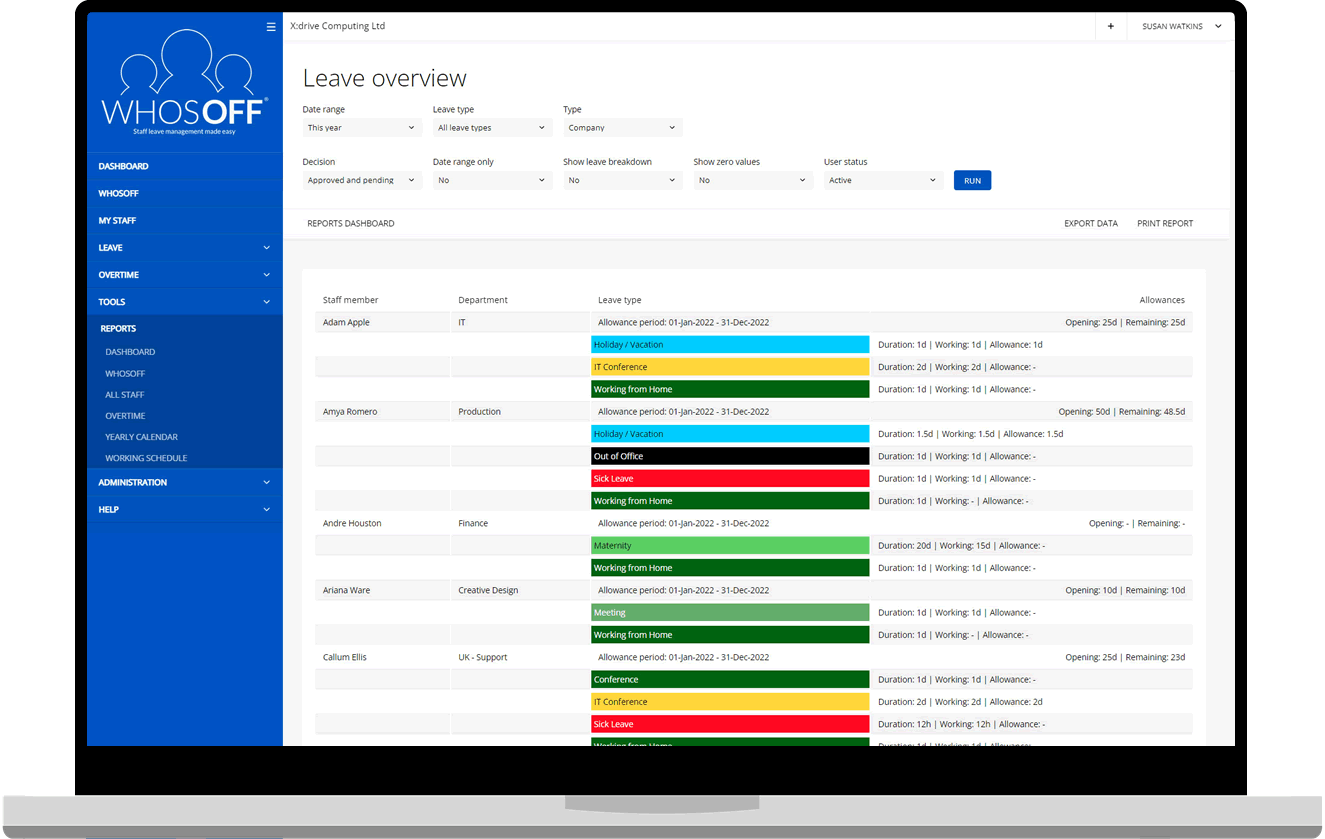
- Leave overview all leave broken down by type, date, and staff member
- Bradford Factor spot absence patterns before they become performance issues
- Allowance summary current and next-year entitlements across the whole team
- Staff yearly calendarmonth-by-month view per employee, great for appraisals
- Limit-based reports see who's approaching or has hit their leave caps
- Overtime & TOIL reports payroll-ready extraction of extra hours worked
- Staff contact directory exportable staff records and directory data
- Export any report to .CSV or .XLSX for use in Excel, Power BI, or Looker Studio
WhosOff in your pocket - free for every user
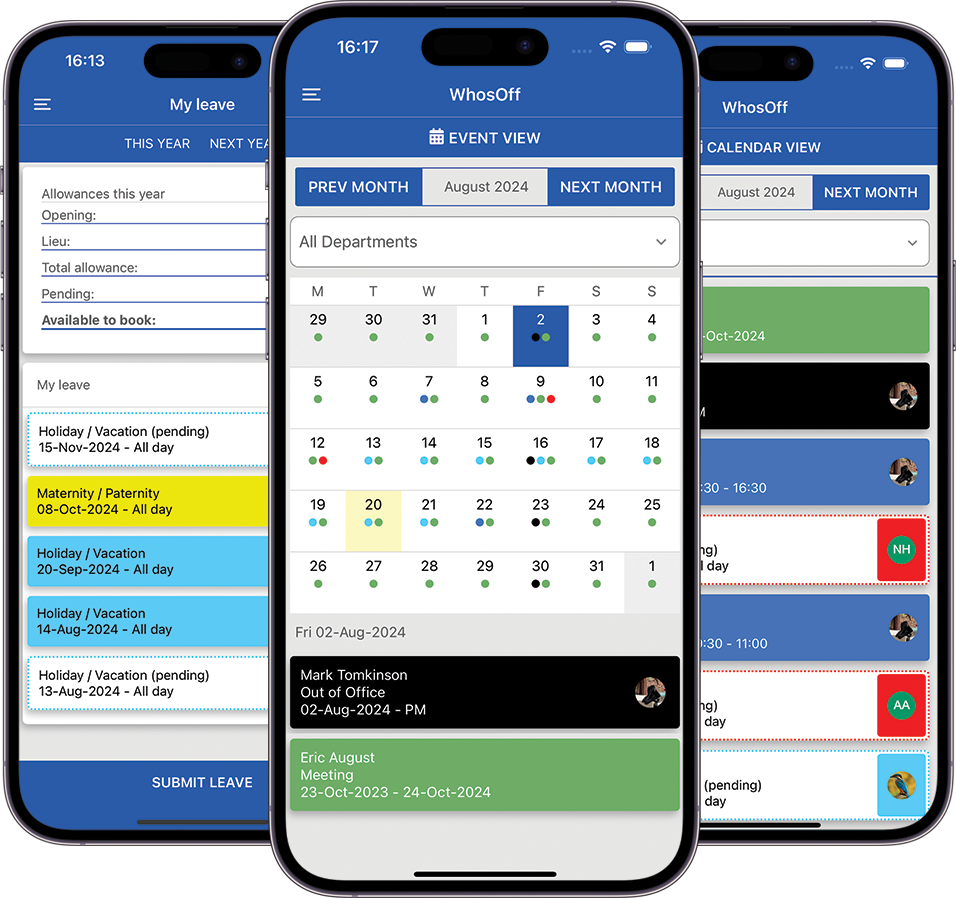
The free WhosOff iOS and Android apps give your entire team access to leave management, approvals, Staff Hub records, and emergency contacts wherever they are - with the same permissions and branding as the web platform.
The full WhosOff experience, anywhere
Everything a manager or staff member needs - leave submission, approvals, overtime recording, Staff Hub access, and document acknowledgements - available from a phone or tablet, even off-site.
- View and manage team absences from anywhere
- Approve or decline leave and overtime requests on the go
- View colleagues' upcoming planned leave without logging into a browser
- Submit overtime and sick-leave reports from the field
- Update emergency contacts and personal details directly from the app
- Acknowledge new company policies and documents via push notification
- Multi-Factor Authentication supported for enhanced account security
- Single Sign-On (SAML) enabled - use your existing company credentials
- Custom branding applies to the app - looks and feels like your own product


From zero to running in minutes - however big your team
WhosOff is built to get out of your way. Import your staff via spreadsheet, set up your structure, apply branding, and go live. And when your team changes - new starters, restructures, carryover season - bulk tools handle the heavy lifting.
Bulk Staff Import
Download the Excel template, fill in your staff details offline, and upload them all at once. Optionally send a welcome email to each new staff member automatically on import.
Onboarding guide →Bulk Leave Booking
Book a half or full day for one or more departments in a single action - ideal for company-wide closures, Christmas shutdowns, or training days across the business.
See it in action →Bulk Allowance Adjustments
Roll over allowances at year-end in one step - copy balances from this year, or reset all employees to a flat value by department. No spreadsheet gymnastics required.
Carryover policies →Bulk Change Approvers
Restructured a team? Promoted a manager? Reassign approvers and departments across multiple staff members at once without editing individual profiles.
See it in action →Custom Branding
Upload your logo and brand colours - applied across the web platform, mobile apps, and all email notifications. Completely free on every WhosOff account.
See branding options →Live Training & Support
Live training sessions, an extensive knowledgebase, and free phone & email support from our UK-based team. No ticket queues, no chatbots, no extra cost.
Visit Knowledgbase →Moving from another system?
Our migration guide and onboarding team make switching to WhosOff straightforward - typically less than a day's work.
See migration guide →WhosOff fits around the tools your team already uses
Connect WhosOff to your calendar, identity provider, payroll system, and any custom tooling via the API. Your leave data flows where it's needed - no manual exports, no switching tabs.













Your data. Your systems. No silos.
Calendar feeds can be scoped to department, leave type, and access level - so staff only see what's relevant to them. And with SSO, logging in to WhosOff is just another app in your existing identity stack.
All integrations > API documentation > Security information >
Enterprise-grade security. No enterprise price tag.
WhosOff is Cyber Essentials certified, GDPR compliant, and a Crown Commercial Service supplier - giving you the security assurances you'd expect from a mission-critical HR system, at a price any business can afford.
Multi-Factor Authentication
Enforce MFA across your entire account at a company level - not just for admins. Optional per-user or company-wide enforcement.
SAML 2.0 Single Sign-On
Integrate with Azure AD, Okta, Auth0, OneLogin, Google Workspace, or JumpCloud. Reduce passwords, improve control.
Role-Based Permissions
Super Users, approvers, and staff members each have distinct permission levels. Staff Hub adds granular per-data-type access controls on top.
Cyber Essentials Certified
Independently assessed and verified against the UK Government's Cyber Essentials scheme - demonstrating protection against the most common cyber threats.
GDPR Compliance
All personal data - including Staff Hub records - is processed in line with GDPR requirements. Data is held securely within the UK and EU.
Audit Trail
Every leave request, approval, staff record change, and document acknowledgement is logged with a timestamp and user reference.
WhosOff vs spreadsheets vs standalone HR systems
| Capability | WhosOff | Spreadsheets | Standalone HR Suite |
| Leave requests & approvals | ✓ | ✗ | ✓ |
| Policy enforcement (restrictions, carryover) | ✓ | ✗ | ✓ |
| Overtime & TOIL management | ✓ | ✗ | ✗ |
| Mobile apps (iOS & Android) | ✓ Free | ✗ | ✓ (often extra cost) |
| Staff Hub - employment & salary history | ✓ | ✗ | ✓ |
| Document storage & compliance tracking | ✓ | ✗ | ✓ |
| Bradford Factor & absence analytics | ✓ | ✗ | ✓ |
| SAML 2.0 SSO support | ✓ | ✗ | ✓ (enterprise tier) |
| RESTful API & webhooks | ✓ | ✗ | ✓ (enterprise tier) |
| Custom branding | ✓ Free | ✗ | Varies |
| Free telephone & email support | ✓ Included | ✗ | Rarely included |
| No long-term contracts | ✓ | ✓ | Usually required |
| Setup time | ✓ < 2 minutes | Hours | Days / weeks |
Trusted by over 2,500 companies worldwide
From five-person startups to global enterprises, WhosOff customers consistently describe the same experience - simple to adopt, easy to love.

"We signed up to WhosOff over 10 years ago and have never looked back. I recommend it to absolutely everyone."
"It's easy to pull the specific data I need for HR purposes and produce reports in WhosOff. We're able to track patterns and better support people's well-being."
"We have found WhosOff.com to be excellent and a highly effective way of managing the leave for the World Cup bid team."
Read full case studies - See how other businesses use WhosOff