
















Spreadsheets were never built to track employee vacation and sick days together
Most teams start with a spreadsheet. It records a vacation day here, a sick day there - but it can't show you team coverage at a glance, flag patterns, or tell the next person who asks how many days someone has left.
Vacation and sick days tracked separately
Most teams end up with one spreadsheet for vacation and another for sick days - neither talking to the other. Getting a complete picture of who's off and why requires manual cross-referencing that rarely happens.
Balances calculated by hand
Every time someone asks how many vacation days they have left, someone has to open the spreadsheet and do the maths. Formulas break, part-time pro-rata is wrong, and carry-over gets applied inconsistently.
No visibility into patterns
A vacation tracking spreadsheet records that someone was off - it doesn't surface whether absences cluster around certain days, or whether one team is consistently short-staffed at peak times.
No mobile access for remote teams
Spreadsheets don't work well on a phone. Remote workers, field staff, and employees who aren't desk-bound have no reliable way to request vacation or check their balance without contacting HR directly.
- Roy L, Head of IT
✗ Vacation & sick separate
✗ Manual balance calc
✗ No real-time calendar
✗ No mobile access
✗ No audit trail
✓ All absence in one system
✓ Balances update instantly
✓ Live shared team calendar
✓ Free vacation tracker app
✓ Full timestamped history
Every vacation day and sick day tracked
automatically - nothing falls through the gaps
WhosOff is a vacation management system that keeps an accurate, real-time record of every employee's vacation and sick day usage, so managers always know exactly where the team stands - without chasing a spreadsheet.
Self-service vacation requests
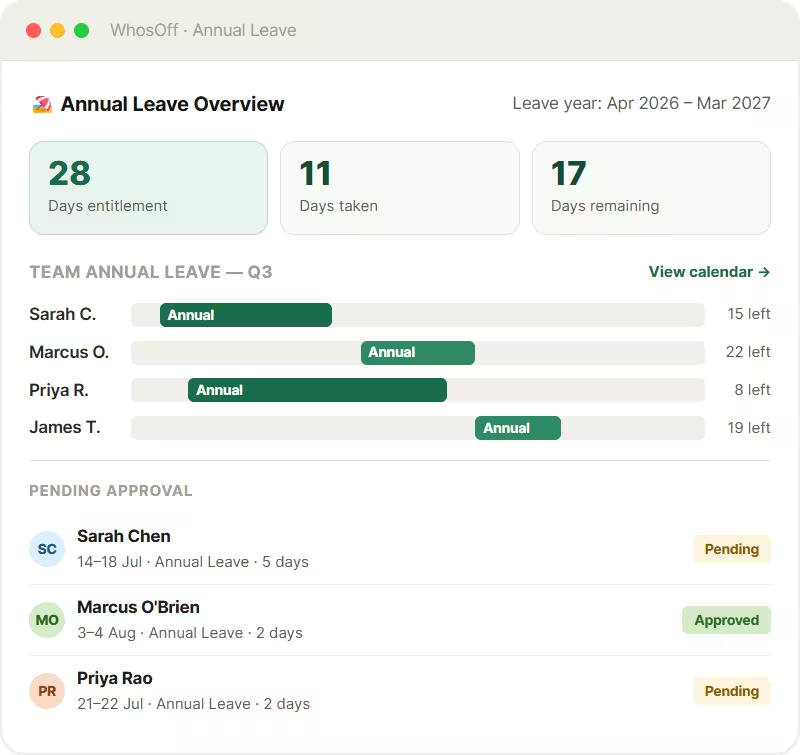
Employees submit vacation requests online or from the free mobile vacation tracker app in seconds. They see their current balance and the team calendar before submitting - so requests are realistic from the start.
Real-time balance tracking
Staff entitlements update the moment a vacation or leave day request is approved. Every employee always sees their exact remaining entitlement - no need to email HR, no guesswork.
Sick day recording alongside vacation
Log sick days in the same system as vacation - not in a separate tracker. WhosOff gives HR and managers one complete view of employee absence, making patterns easier to spot and reports far simpler to produce.
Know the moment you're approved
Push notifications confirm the second a manager approves or declines a request. No checking back, no uncertainty - employees can plan with confidence as soon as a decision is made.
Cancel with ease
Plans change. Employees can cancel a pending or approved request directly from the app, with the notification automatically routed to the correct line manager.
Full request history at a glance
Every holiday request - past, pending, and approved - with notes - is visible in one place. No more digging through email threads to confirm what was agreed or when.
Spot conflicts before they're
approved - not after they're a problem
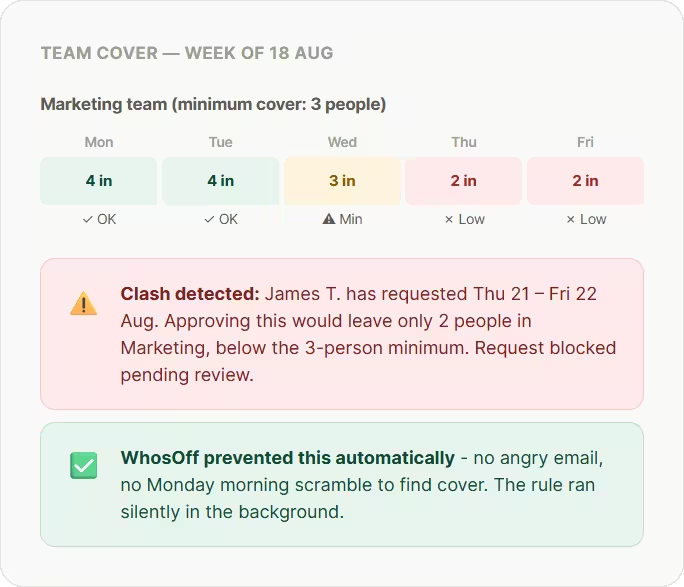
Because every employee sees the shared team vacation calendar before they submit a request, most clashes are avoided before they even reach a manager. For those that do, WhosOff's cover rules catch them automatically.
Employees see team availability before requesting
When an employee opens the vacation request form, the shared team calendar is right there. They can see who's already off during their preferred dates and choose a different week if needed - before the request is ever submitted.
Minimum cover rules enforced automatically
Set the minimum number of people who must be available per team or role, and WhosOff enforces it automatically - flagging or blocking vacation requests that would breach the threshold before they reach an inbox.
Blackout periods for peak times
Lock out specific dates - quarter-end, peak business periods, major deadlines - so employees cannot request vacation during times when you need full team availability. Rules apply automatically without any manual policing.
No need for constant alerting
Instead of managers receiving alerts left, right, and center - WhosOff handles the minimum levels set out by HR, automatically. Staff are informed directly on screen if any rules are breached, allowing them to adjust their plans.
The vacation management system teams worldwide have trusted since 2005
Cloud-based - nothing to install
WhosOff is a fully cloud-based vacation management system. No software to install, no servers to maintain. Sign up today and your team is tracking vacation and sick days within the hour.
Free vacation tracker app for every user
The WhosOff mobile app is free for every employee on your account - for iOS and Android. Employees request vacation, check balances, and view the team calendar from their phone. Managers approve on the go.
One system for vacation and sick days
Vacation, sick days, PTO, and every other absence type live in the same shared system - so HR and managers get one complete picture of staff availability, rather than juggling separate trackers.
Real, responsive support
Our Canterbury-based support team answers calls and emails Monday to Friday, 9am–5.30pm. No bots, no offshore queues - real people who know the product and can answer questions immediately.
WhosOff at a glance
2,500+
companies using WhosOff800k+
employees managed4.4★
average review score20 yrs
in business since 2005- Up to 8 weeks FREE trial
- No credit card required
- No setup fee or long-term contract
- Free vacation tracker app for all users
- Vacation & sick days tracked together
- Cyber Essentials certified
- G-Cloud Crown Commercial Services supplier
One calendar for vacation, sick days,
and every other absence - always current
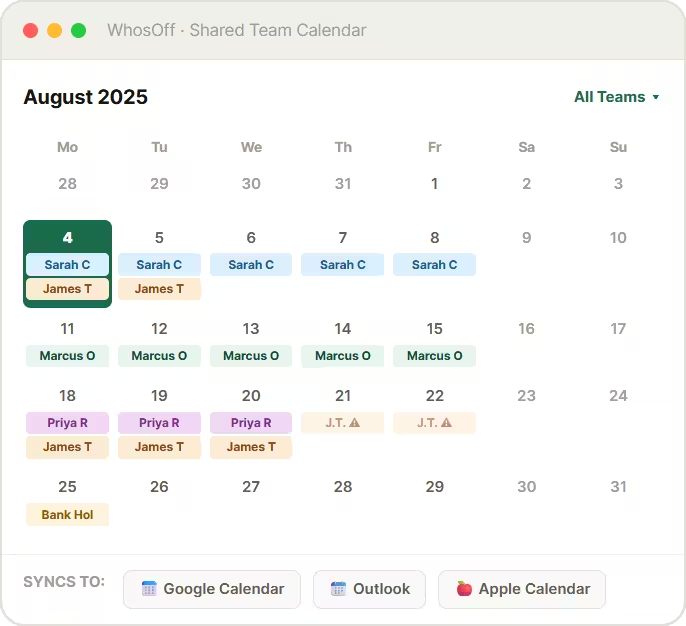
The WhosOff shared team vacation calendar shows every approved and pending absence in real time - colour-coded by type so managers can see at a glance exactly who's off, whether it's vacation, a sick day, or something else entirely.
Vacation and sick days, colour-coded
Vacation, sick days, PTO, and other absence types are clearly distinguished on the calendar - so managers instantly know the nature of every absence, not just that someone is off.
Filter by absence type or team
Want to see only vacation across the whole organisation, or one department's full absence picture? Filter the shared calendar instantly - on desktop or the vacation tracker app.
Pending requests visible immediately
Pending vacation requests appear on the calendar the moment they're submitted - so colleagues planning their own time off can see the full, current picture and avoid requesting the same peak dates.
Syncs to Google & Outlook
Approved vacation and sick days sync automatically to Google Calendar, Outlook, and Apple Calendar - so the whole team always knows who's available without switching to a separate system.
Spreadsheet vs WhosOff:
the honest vacation tracker comparison
If you're still tracking employee vacation and sick days in a spreadsheet, here's exactly what changes when you move to a dedicated vacation management system.
| Vacation tracking task | Spreadsheet | WhosOff |
| Request vacation | ✗ Email manager, update spreadsheet manually | ✓ Self-service online or via the vacation tracker app |
| Approve or decline requests | ✗ Reply to email thread, update at least two cells | ✓ One click from any device - decision notified instantly |
| Track vacation and sick days together | ✗ Two separate spreadsheets, rarely cross-referenced | ✓ All absence types in one system, one calendar |
| Real-time vacation balance per employee | ✗ Static formula - out of date until someone updates it | ✓ Updates automatically the moment a request is approved |
| Carry-over at year-end | ✗ Manual row-by-row adjustment each year | ✓ Policy-driven - applied by HR |
| Prevent vacation clashes | ✗ No automated checks - discovered after approval | ✓ Cover rules and team calendar prevent clashes proactively |
| Mobile access for employees | n/a Not designed for mobile use | ✓ Free vacation tracker app for iOS and Android |
| Sync to Google Calendar or Outlook | ✗ Manual export required | ✓ Automatic, no action needed |
| Payroll-ready vacation report | ✗ Manual pivot tables and reconciliation | ✓ One-click export to CSV or XLSX |
| Audit trail | ✗ No reliable record of who changed what | ✓ Full timestamped history, always exportable |
| Time to action a request | ~ Hours to days, dependent on email | ✓ Often minutes, via push notification |
2,500+ teams use the WhosOff
app every day

"We now have greater accessibility across shifts with increased accuracy and visibility"
HR Manager
"If you’re thinking of moving to an online holiday planner, I’d advise you to do it sooner rather than later!"
Director
"WhosOff was a no-brainer for us, as everyone can easily access the system and see each other’s availability"
Content Manager
2,500+
Companies using WhosOff800,000+
Employees managed4.4★
Average review score20 yrs
in business since 2005Vacation management software
questions, answered
Common questions about tracking employee vacation and sick days with WhosOff.
What is vacation management software?
What is the best vacation tracker software for teams?
Can WhosOff track both employee vacation and sick days in one system?
Is there a free vacation tracker app?
Can employees see the team vacation calendar before requesting time off?
How does WhosOff prevent vacation clashes?
Does the vacation management system sync with Google Calendar and Outlook?
What vacation reports does WhosOff produce for HR and payroll?
How long does it take to set up WhosOff for my team?
Ready to Replace Your Holiday Spreadsheet?
Join over 2,500 UK companies that have switched to WhosOff - the staff holiday planner that prevents clashes, tracks every balance automatically, and keeps your whole team in sync.
Prefer to talk? Call +44 (0)1227 812932 or email our team - Mon-Fri, 9am-5.30pm