



















A spreadsheet can't fit in anyone's pocket
If your staff holiday planner is still a spreadsheet, your team can only book or check holiday when they're sat at a desk. For remote workers, field staff, and anyone who isn't desk-bound all day, that's a real barrier - and it's costing you time and goodwill.
Desktop-only access
A spreadsheet shared on a drive is awkward on mobile and often impossible to edit properly from a phone. Staff end up waiting until they're back at a computer just to book a day off.
Managers approve from inboxes, not apps
Without a dedicated leave app, managers approve holiday by replying to email between meetings - easy to miss, easy to forget, and slow for the employee waiting on an answer.
No instant notifications
Employees have no way to know the moment their request is approved. They're stuck refreshing an inbox or asking their manager directly - which defeats the point of a self-service system.
Field and remote teams left out
Staff who work on-site, travel for work, or work remotely are the people who most need mobile access - and the people most poorly served by a spreadsheet-based holiday planner.
- Roy L, Head of IT
✗ Desktop only
✗ No push notifications
✗ Approvals via email
✗ No mobile calendar view
✗ Field staff left behind
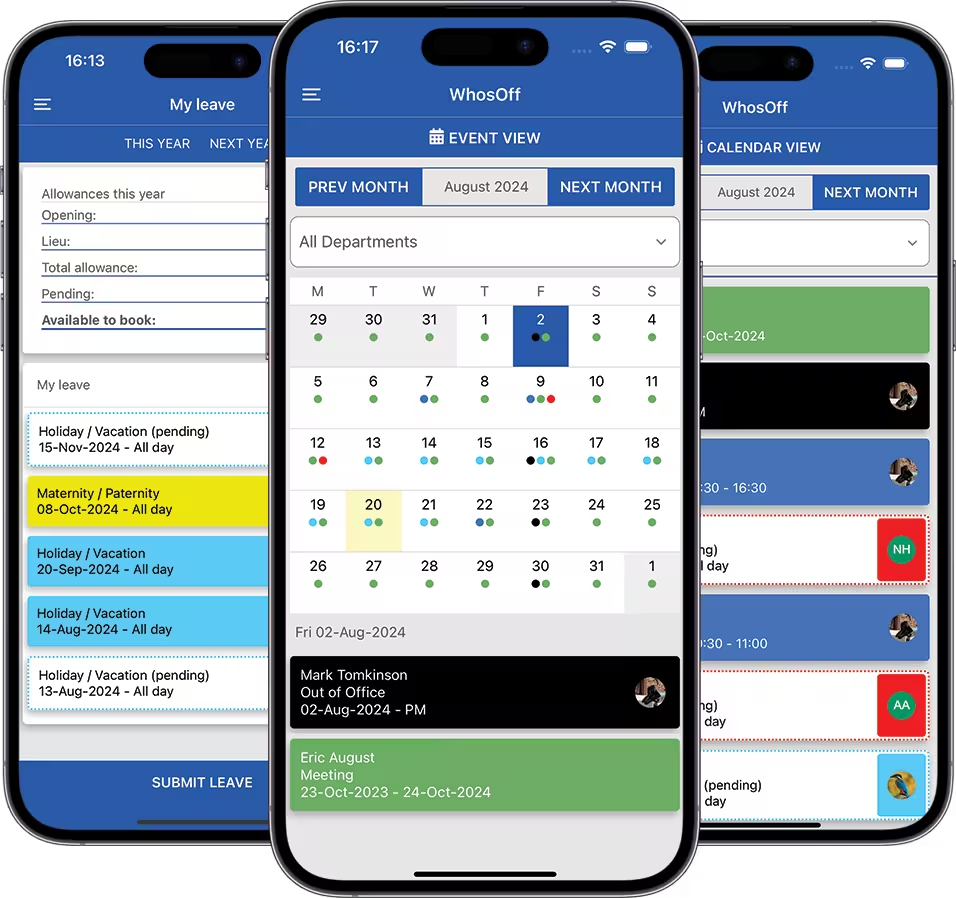
✓ Free iOS & Android app
✓ Instant push notifications
✓ One-tap approvals
✓ Full calendar on your phone
✓ Works anywhere, for anyone
Book holiday in seconds -
knowing exactly where you stand
The WhosOff employee holiday app gives every member of staff everything they need to request holiday confidently: their current balance, the team calendar, and instant confirmation - all before they hit submit.
See your exact balance first
Before requesting a single day, employees see precisely how much holiday they have left. No guesswork, no need to ask HR - the app always shows the current, accurate figure.
Check the team calendar first
See who else is already off during the dates you're considering, right from the app, before you submit. Book with confidence that you're not creating a clash for your team.
Submit a request in under 30 seconds
Select your dates, choose the leave type, add an optional note, and submit. The whole flow takes seconds - far faster than drafting an email or finding the right spreadsheet tab.
Know the moment you're approved
Push notifications confirm the second a manager approves or declines a request. No checking back, no uncertainty - employees can plan with confidence as soon as a decision is made.
Cancel with ease
Plans change. Employees can cancel a pending or approved request directly from the app, with the notification automatically routed to the correct line manager.
Full request history at a glance
Every holiday request - past, pending, and approved - with notes - is visible in one place. No more digging through email threads to confirm what was agreed or when.
Clash prevention that works from a phone, not just a desk
Because every employee carries the team calendar in their pocket, clashes get spotted and avoided before a request is even submitted - whether someone's planning their holiday from the office or from the sofa.
Live team availability, on every screen
The shared team calendar is built into the app - not a separate system staff have to remember to check. It's right there, the moment they open the request screen.
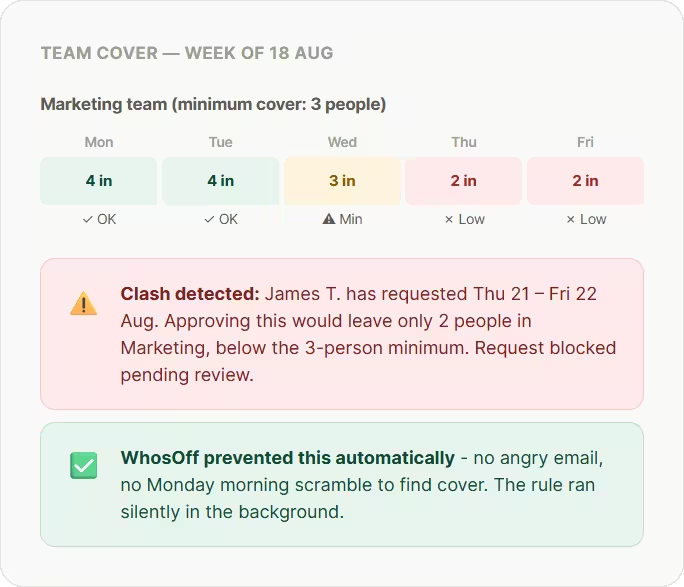
Minimum cover rules enforced on mobile too
Whether a request comes from the desktop site or the app, the same minimum cover and blackout period rules apply automatically - consistency that a spreadsheet simply can't offer.
Managers get push notifications, not buried emails
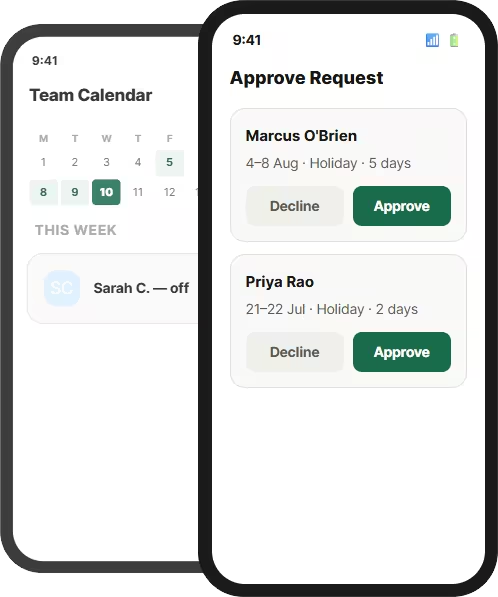
A pending request lands as a push notification on the manager's phone - not as one more email in a crowded inbox. It's far harder to miss, and far faster to action.
Approve from anywhere, in one tap
Managers don't need to be at a desk to action a request - they can approve or decline from the app between meetings, on a train, or between job sites.
Mobile Holiday Requests with the WhosOff App
Free for every user. The WhosOff staff holiday planner app brings the full power of the platform to iOS and Android - built and trusted by UK businesses since 2005.
Free for every user, no extra cost
Unlike many leave apps that charge per mobile seat, the WhosOff app is included free with every plan - for every single employee on your account.
Real push notifications, not just email
Requests, approvals, declines, and reminders arrive as native push notifications - fast, reliable, and far more visible than an email buried in an inbox.
Built and supported in the UK
Designed around UK leave rules and supported by our Canterbury-based team Monday to Friday, 9am–5.30pm - not an offshore call centre reading from a script.
2,500+ companies, 800k+ employees
WhosOff has been the staff holiday app of choice for UK businesses for two decades, rated 4.4 stars on Capterra by real customers.
One calendar. Every device.
Always up to date.
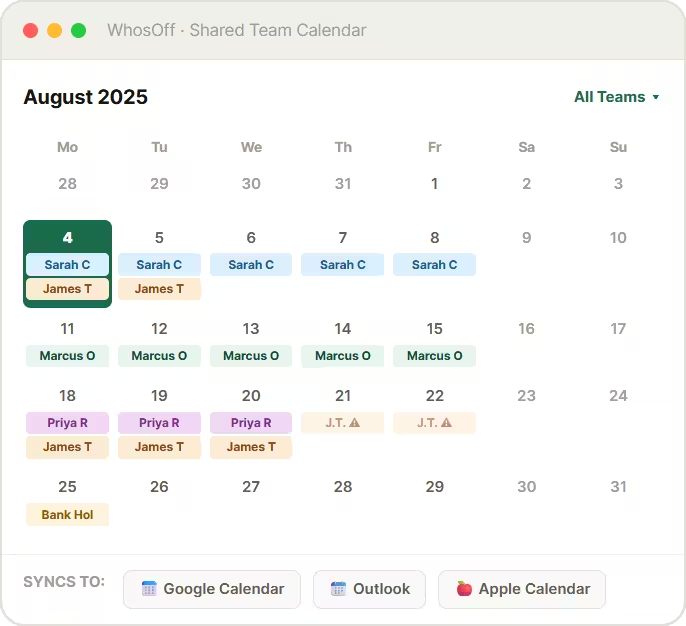
The same shared team holiday calendar that powers the WhosOff desktop site is built directly into the app - so whether your team checks from a laptop or a phone, everyone sees exactly the same picture.
Identical data, every device
The iOS and Android apps shows the same real-time calendar as the desktop site, so nothing is ever out of sync between platforms.
Filter by team, even on the smallest screen
Tap to filter the calendar by department or team directly within the app - useful for managers checking cover on a specific team while away from their desk.
Pending requests visible immediately
Pending holiday appears on the app calendar the moment it's submitted - so colleagues planning their own holiday can see the full, current picture, not just confirmed bookings.
Still syncs to Google & Outlook
Approved holiday booked from the app syncs automatically to Google Calendar, Outlook, and Apple Calendar - the same as if it had been booked from a desktop browser.
Spreadsheet vs WhosOff App:
an honest side-by-side
If you're weighing up whether a dedicated holiday request app is really worth switching to, here's exactly what changes for your team.
| Holiday request task | Spreadsheet | WhosOff |
| Submit a holiday request | ✗ Desktop only, via email or spreadsheet | ✓ From any phone, in under 30 seconds |
| Check remaining holiday balance | ✗ Email HR or open a spreadsheet | ✓ Visible instantly in the app, always accurate |
| Approve or decline requests | ✗ Reply to email from a desk | ✓ One tap from anywhere, on any device |
| Get notified of a decision | ✗ Wait for an email reply | ✓ Instant push notification |
| View the team holiday calendar | ✗ Desktop spreadsheet, often outdated | ✓ Real-time, built into the app |
| Access for remote & field staff | ✗ Poor - desktop-dependent | ✓ Full functionality from any phone |
| Cost of the mobile app | n/a No app exists | ✓ Free for every user, on every plan |
| Calendar sync (Google, Outlook) | ✗ Manual export | ✓ Automatic, from app or desktop |
| Clash prevention before submitting | ✗ No automated checks | ✓ Team calendar shown before booking |
| Time to action a request | ~ Hours to days, dependent on email | ✓ Often minutes, via push notification |
2,500+ teams use the WhosOff
app every day

"We now have greater accessibility across shifts with increased accuracy and visibility"
HR Manager
"If you’re thinking of moving to an online holiday planner, I’d advise you to do it sooner rather than later!"
Director
"WhosOff was a no-brainer for us, as everyone can easily access the system and see each other’s availability"
Content Manager
2,500+
Companies using WhosOff800,000+
Employees managed4.4★
Average review score20 yrs
in business since 2005Holiday request app
questions, answered
Common questions about the WhosOff staff holiday app.
What is a holiday request app?
Is the WhosOff staff holiday app free?
Can managers approve holiday requests from their phone?
Does the holiday request app work offline?
Is the employee holiday app suitable for remote and field-based teams?
What's the difference between the WhosOff app and the desktop site?
Can I see the team holiday calendar in the app before requesting time off?
Does the leave app send reminders if a manager hasn't responded?
How long does it take to set up WhosOff and roll out the app to my team?
Is there a free trial of WhosOff, including the app?
Ready to Replace Your Holiday Spreadsheet?
Join over 2,500 UK companies that have switched to WhosOff - the staff holiday planner that prevents clashes, tracks every balance automatically, and keeps your whole team in sync.
Prefer to talk? Call +44 (0)1227 812932 or email our team - Mon-Fri, 9am-5.30pm