

"We signed up to WhosOff over 10 years ago and have never looked back. I recommend it to absolutely everyone.."
"It’s easy to pull the specific data I need for HR purposes and produce reports in WhosOff. We’re able to track patterns and better support people’s well-being.""
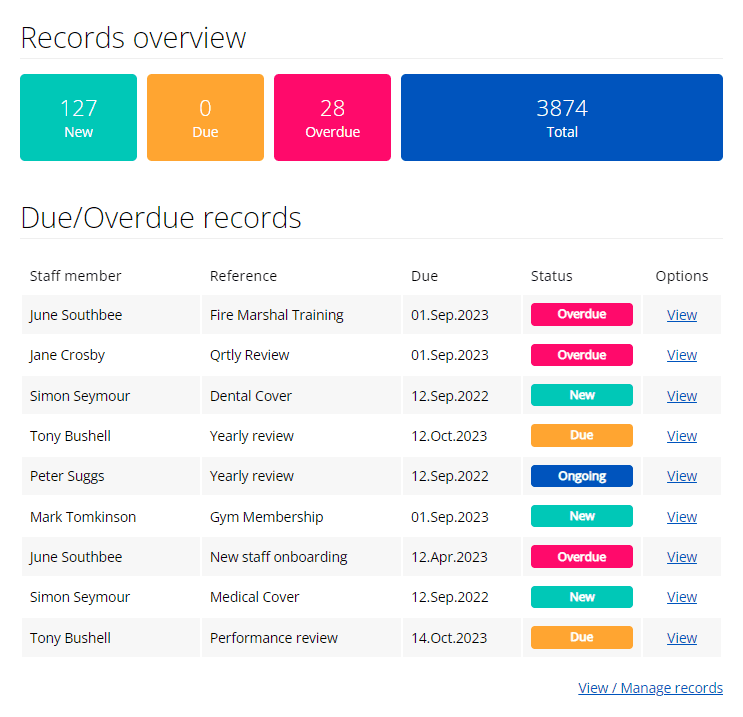
Unline basic record-keeping tools, WhosOff's Staff Hub integrates directly with your leave management system, giving you unified workforce visibility. Perfect for growing businesses that need more than spreadsheets but don't want the complexitiy of enterprise HR suites.
Integrated with leave management
Staff records sync with holiday bookings, overtime, and absence tracking.
Industry-proven
Used by healthcare teams for certification tracking, retail for training compliance, and professional services for benefits management.
Scalable approach
Start with basic records and expand to full document management as your team grows.
Successful staff record management requires maintenance of accurate and well-organised employee records. Our staff hub allows you to maintain a professional repository of records, customised to suit your business requirements.
Keep track of those extra incentives you offer to your employees, from dental and healthcare, to pensions or cycle to work schemes.
Are skills and experience an important element within your recruitment and retention policies? Manage first aid, required licenses and more.
Regular, structured staff probation, reviews and evaluations can be planned and managed.
Human resources
Nobody likes to talk about it, but, it needs taking care of. From verbal, to written and final warnings.
and, whatever you can think of...
If there is a category of records you can think of, you have control to create your own, you're in charge!
Get your account today and have until Saturday, 25th April 2026 to try the full system, for Free!
Get your long FREE trial today!Do you imagine a simple way of uploading your company handbooks and policies and making them available to your staff members? How about uploading documents that you require some (or all) of your staff members to read? Or, do you need the ability to upload a training certifcate against a member of staff and know when that certificate will expire?
Our new optional feature within Staff hub allows you to do all of this, and more...
Everything from health and safety, ISO procedures, fire plans, evacutation procedures and more. Upload them once and make them available to your entire workforce within a few clicks.
Any benefits programs offered, whether it be split by teams, levels of employment, or by staff member, can be uploaded and associated with the relevant team members.
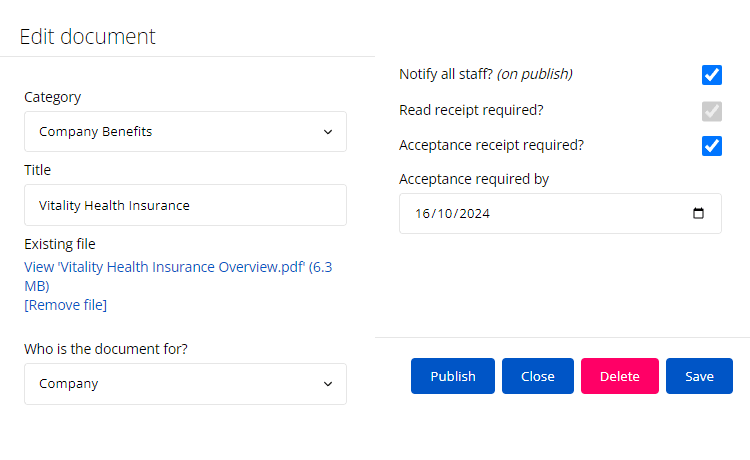
Track changes within company contracts by uploaded them into WhosOff, storing them against a staff member and having them to hand whenever needed.
If you conduct monthly, quarterly, and/or yearly staff reviews and these reviews carry the same structure, upload your review templates ready to share with the HR team.
Get your account today and have until Saturday, 25th April 2026 to try the full system, for Free!
Get your long FREE trial today!If you have files stored within any of the following types you will be able to upload these to the document storage area.

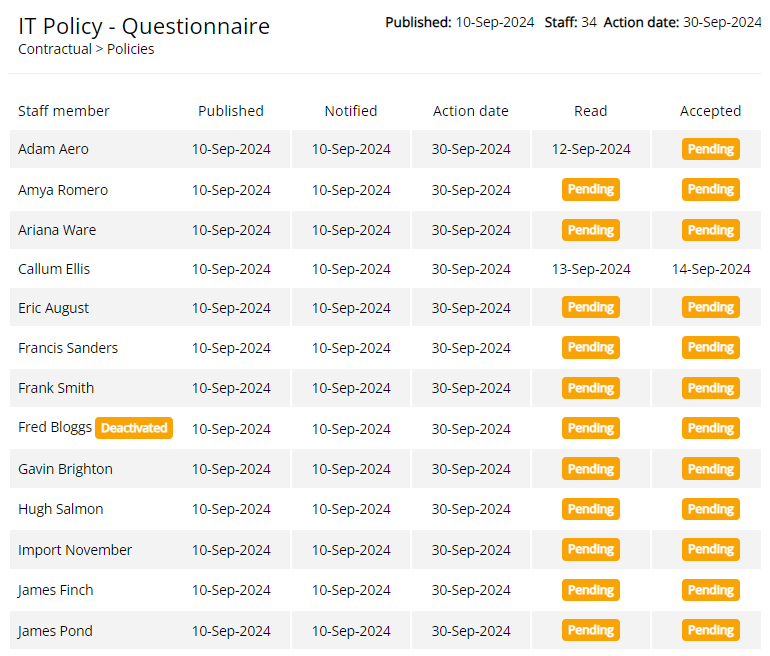
Choose whether you require all the staff associated with the document to read the document.
Accepted receiptsChoose whether associated staff are required to confirm acceptance of the document.
Date requirementIf you decide all associated staff have to accept a document, you are also able to specify a date (optional) in which acceptance is required by.
NotificationsYou also have the option to notify each associated staff member when new documents are published, informing them if action(s) require completing.
Get your account today and have until Saturday, 25th April 2026 to try the full system, for Free!
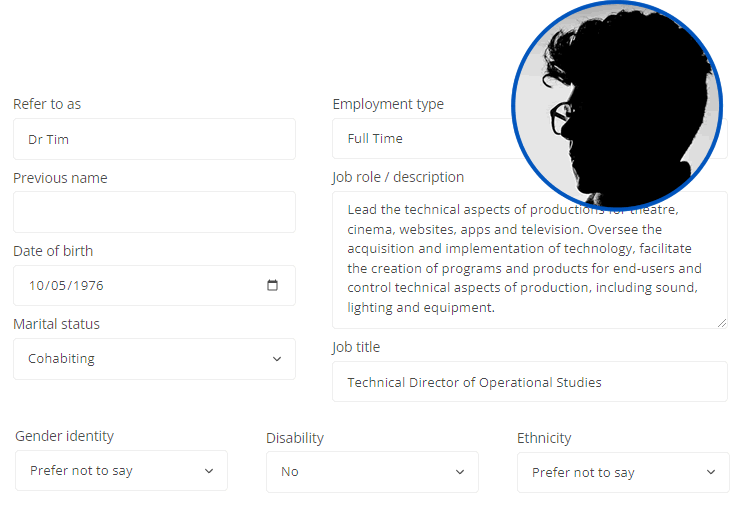
Get your long FREE trial today!Contact details, employment information and more all in one convenient place. With Staff Hub you can store and manage your staff members basic personnel data - helping you keep track within WhosOff.
Privacy is everything when dealing with personnel data - that's why you can control exactly who can manage this data, from staff member to staff member.
Keep track of changeable staff employment details, including:
- Compensation history: Track the pay rate, type, schedule and contractual hours throughout a staff members employment.
- Employment history: Track job type, title, team/division, role/description, who the staff member reports to as well as the date each change was effective from.
To help you ensure that you are meeting your requirements and improving your practices, use WhosOff to store your diversity information.
Personal informationA convenient area to manage staff personal information, allowing HR managers to easily store personal contact information for their staff.
Get your account today and have until Saturday, 25th April 2026 to try the full system, for Free!
Get your long FREE trial today!Stop chasing staff for document signatures or missing training renewals. WhosOff automatically tracks expiry dates and sends notifications before certifications lapse.
Dashboard widgets surface upcoming training renewals, benefit enrollment deadlines, and policy acknowledgments requiring attention.
GDPR-compliant data handling, Cyber Essentials certified security, and role-based permissions ensure you meet regulatory requirements without the complexity.
Staff can access their own records, update emergency contacts, and acknowledge new policies through WhosOff's iOS and Android apps.
Have the power to control staff data and ensure it is accessable to only the right people.
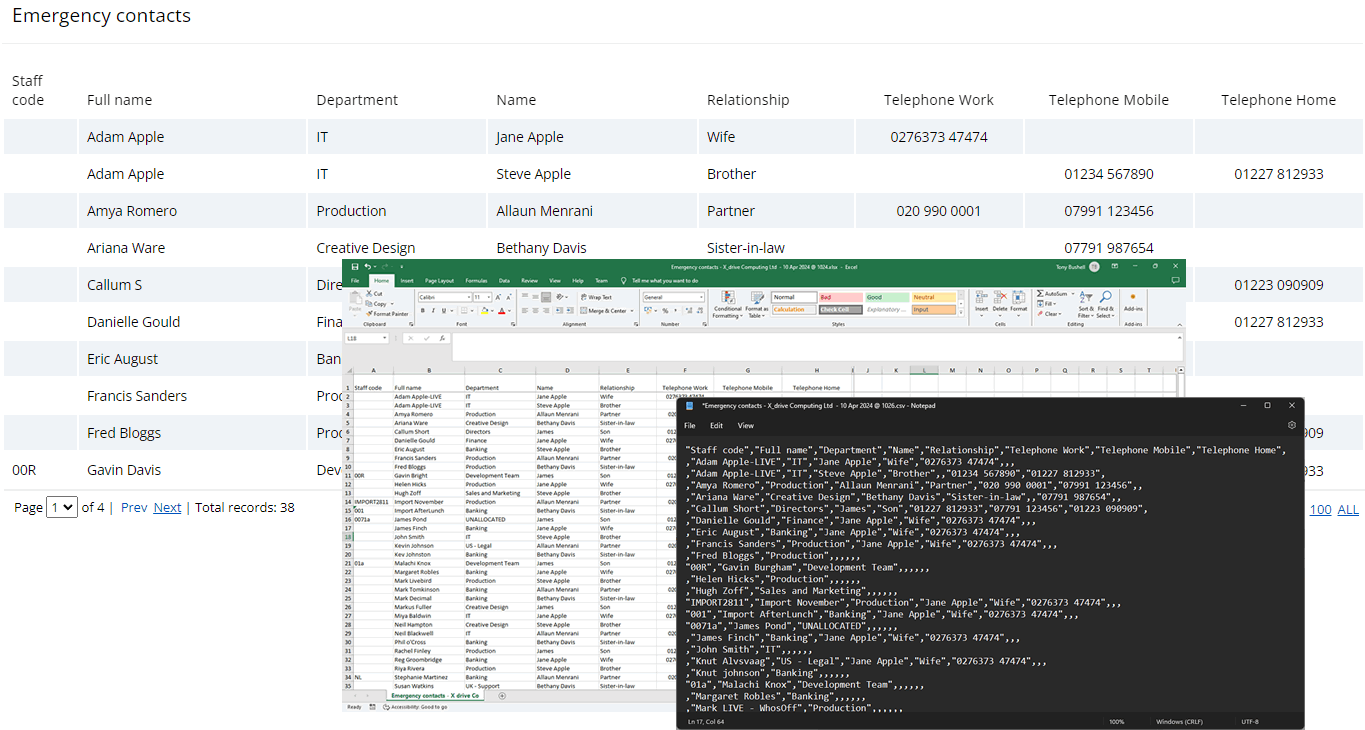
Improve the visibilty and management of your staff members' emergency contacts and ensure the right people have access to view it.
No need to search around for emails and telephone numbers any more, as staff directory displays them in one easy-to-use report.
WhosOff Staff Hub works alongside your current tools, not against them. Connect with payroll systems, sync with Single Sign-On providers, and export data when needed.
Azure, Okta, Auth0, OneLogin for seamless access
Export staff records and compensation history for payroll processing
Standard exports ensure you're never locked into our system
Check out all the features currently availible in the staff hub, with more to come soon!
Already using WhosOff? Login now to find out more about how staff hub can help your business.
Staff directory
Staff directory has a new home in the staff hub - with all the flexibility of the new staff hub permissions. So if you need to enable or restrict this view on a per user basis, you can.
Emergency contacts
With the emergency contact area, staff members and managers can easily access all right data in one place. Add as many or as few contacts to each of your staff to ensure that you are storing the most relevant data and even allow users to input and manage their own.
Document storage
An optional feature within Staff hub - with everything you would expect from document storage. Upload and manage all of your company documents from one central location, everything from company policies to staff contracts.
Personnel details
Any array of personnel details can now be stored within your WhosOff account. With the new staff hub permissions area, the control is in the hands of only those you want to access it.
Staff records
Track and manage staff records; everything from company benefits such as healthcare, to health and safety training records and more. Whatever you classify as a record category can be tracked.
Tasks requiring your attention
Staff training expiring soon?, or employee dental benefit lapsed? No need to worry, as with WhosOff you can now track these records accurately.
Customised categories
We'll give you a helping hand with a few popular categories, such as Company Benefits, Training and Performance, but, with the control you can create whatever categorisation you prefer to manage your staff records with.
Permissions, managed your way
New area, new permissions. Control over your staff hub data by each area, for each staff member. For example, this gives you the control to nominate one or more users to be responsible for managing emergency contact but restrict those same users from viewing personnel data. This level of customisation will allow you to confidently manage staff information through the all new staff hub.
Dashboard widget
Include an overview of staff records requiring attention on your personal dashboard, delivered direct to your inbox daily.
How does Staff Hub differ from standalone HR software?
Staff Hub integrates with WhosOff's leave management system, giving you connected workforce data rather than siloed information. Perfect for businesses that want comprehensive people management without enterprise complexity.
Can I import existing employee records?
Yes, use our bulk import wizard to upload staff records via spreadsheet. Your existing data transfers quickly with our onboarding support.
What file types can I store in document management?
PDF, Word, Excel, images, and more. All files are stored securely with read/accept tracking and automatic expiry notifications.
Is my staff data secure and compliant?
WhosOff is Cyber Essentials certified with GDPR-compliant data handling, role-based permissions, and optional multi-factor authentication for enhanced security.