Why choose an online leave system like WhosOff?
Simple: Streamlined leave management
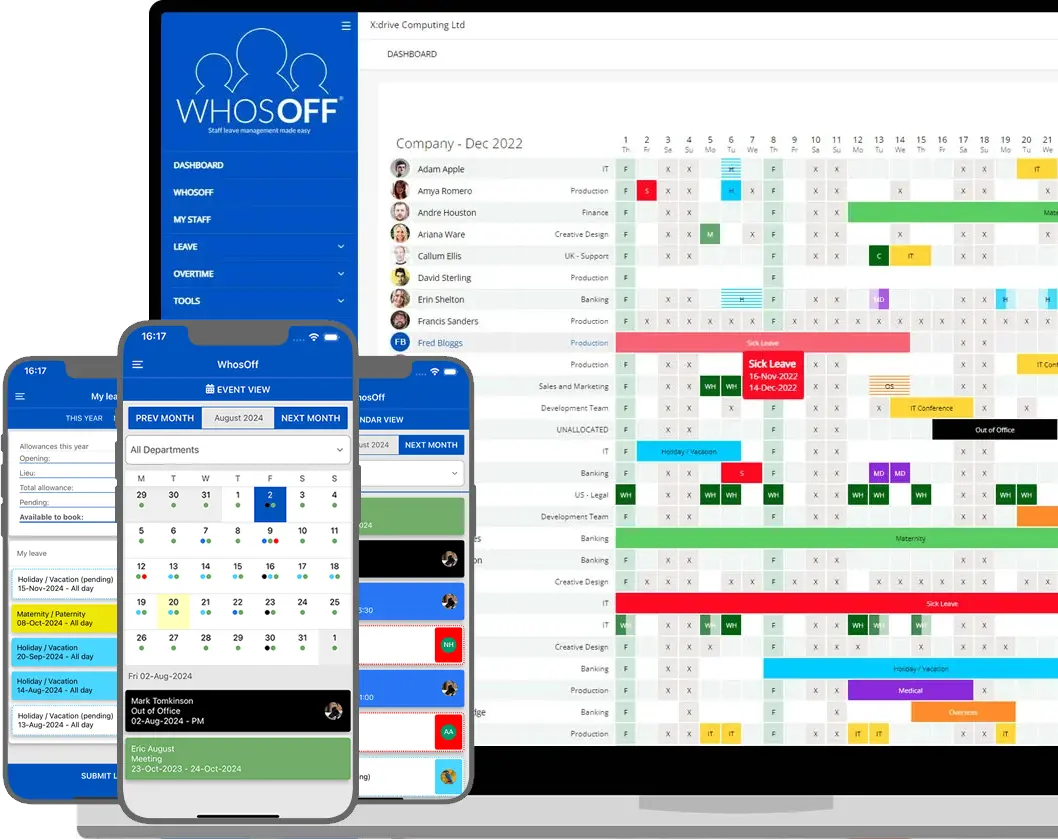
Streamline the way you submit, approve and manage employees’ annual leave with WhosOff’s online staff holiday booking system. It’s affordable, cloud-based and completely paperless.
With WhosOff, everyone in your company has access to an online work holiday calendar – so you can see who’s on leave, prevent critical calendar clashes, and make sure requests are sent directly to the right people for approval. Ensuring your team get the time off they want without it compromising company productivity.
Let's get integrated
Leave management software that
connects to your workflow
Connect WhosOff to your tech stack, either using our dedicated API, SSO integrations, or using Webhooks to connect to Microsoft Teams, Slack, AirOps and more.













Everything you need to get your team
onboarded with WhosOff
Guided setup wizard
When you first sign up, WhosOff's onboarding wizard walks you through every configuration step in the correct order - from company details and department structure through to leave setup and your first employee records - with helpful prompts at every stage.
Bulk CSV staff import
Download WhosOff's ready-made spreadsheet template, populate it with your staff details, and upload it. Dozens or hundreds of employees are created in a single action — no manual data entry, no repeated form-filling, no IT resource required.
Role-based permission levels
Assign every team member a permission level: employee, line manager, or administrator. This determines exactly which features they can access. Permissions can be updated at any time as people's roles change or as your team grows.
Free first-class support
Our UK-based team is available by phone and email Monday to Friday, 9am to 5.30pm - free of charge, before and after your trial. Whether you need guidance during the initial setup or help adding staff months later, we are always here.
Free iOS & Android apps
Staff download the free WhosOff mobile apps as part of their onboarding. From day one, they can submit leave requests, check balances and view the team calendar from their phones, whether at their desk, at home, or on the move.
Ready-made quick user guides
WhosOff provides a library of clear, ready-made reference guides you can share with your team during onboarding - covering leave requests, balance checks, calendar views, and manager approvals - without writing a word of documentation yourself.
Free webinars, demos & video tutorials
Book a free personalised demo to see WhosOff in action before you commit, join a live onboarding webinar during setup, or work through the full video tutorial library available in the knowledgebase — all included at no cost.
Company branding
Apply your logo and corporate identity to the WhosOff interface and outgoing emails during setup. A branded experience drives staff confidence from day one and reduces onboarding friction across the organisation.
Switching from another system?
Moving from Timetastic, BrightHR, CharlieHR, e-Days, LeaveTrack, or a spreadsheet? Our dedicated migration support service transfers your staff data, leave history, and policy configurations with minimum disruption. Find out more about migrating to WhosOff by contacting our support team.
How WhosOff is different from
other leave management platforms
Over 3,000 companies have used WhosOff to manage their annual leave, saving time and resource, resulting in more productive workforces. WhosOff's easy to use holiday booking tools are loved by companies big and small.



















Get your instant, free, WhosOff trial today
Each account has access to:
- Access to all WhosOff's key features
- Guided setup wizard with step-by-step configuration
- Free webinars, video tutorials, and ready-made user guides
- Free telephone and email support from our team of experts
- No long-term contracts or commitments
Fancy a demo? Call +44 (0)1227 812932, or email our support team.
By completing the form above, you agree to the Terms and Conditions,
Terms of Use and Privacy Policy