It’s the season of giving, and we’ve got some gifts for you — fresh updates to WhosOff that make managing leave faster, smarter, and easier than ever.
From brand-new security options to a complete re-write of the WhosOff calendar (yes, it’s lightning fast!), these changes are designed to save you time and keep your team running smoothly.
At WhosOff we work with our users to add improvements whenever its possible, sometimes big changes and sometimes small, along with minor tweaks that always help to make a difference, recently has been no exception.
If you've logged into your WhosOff account you've probably already noticed some differences! One of the biggest being the re-write of the WhosOff calendar, with extensive testing proving it to be ⚡faster than it's predecessor.
If you have any questions, feedback, or suggestions for future enhancements, drop our support team an email.
✨ What’s New?
Here’s a quick look at the goodies now live on WhosOff:
- Yearly carryover with expiry dates: set deadlines for unused, carried over leave.
- Day-by-day identification: tag days as WFH, training, travelling, and more.
- Clearer allowances: instantly see how much leave is left to book.
- Public holiday imports: still includes UK, but now region/state-specific for global teams.
- Concurrent request blocking: stop back-to-back bookings when needed.
- Security upgrades: tougher password rules and lockout options.
🔥 Yearly carryover with expiry dates
No more headaches juggling contracts and carryover rules. Now you can add expiry dates to staff allowances — perfect if you want unused leave cleared by March, for example.
Running the carryover process can be a daunting exercise for any company; alternative staff contracts may present differing levels of maximum carryover amounts that can be processed. Luckily enough WhosOff already caters for this in it's yearly carryover tool. In addition to this, expiry dates can now be specified against each staff members carryover allowance, so if you require any unspent leave from this year to be used by the 1st March next year then this can now be done.
🏷️ Day by day identification
Want to mark Fridays as WFH without a leave request? Done.
Need to highlight training days or branch office work? Easy.
Your calendar now shows exactly where your team is, at a glance.
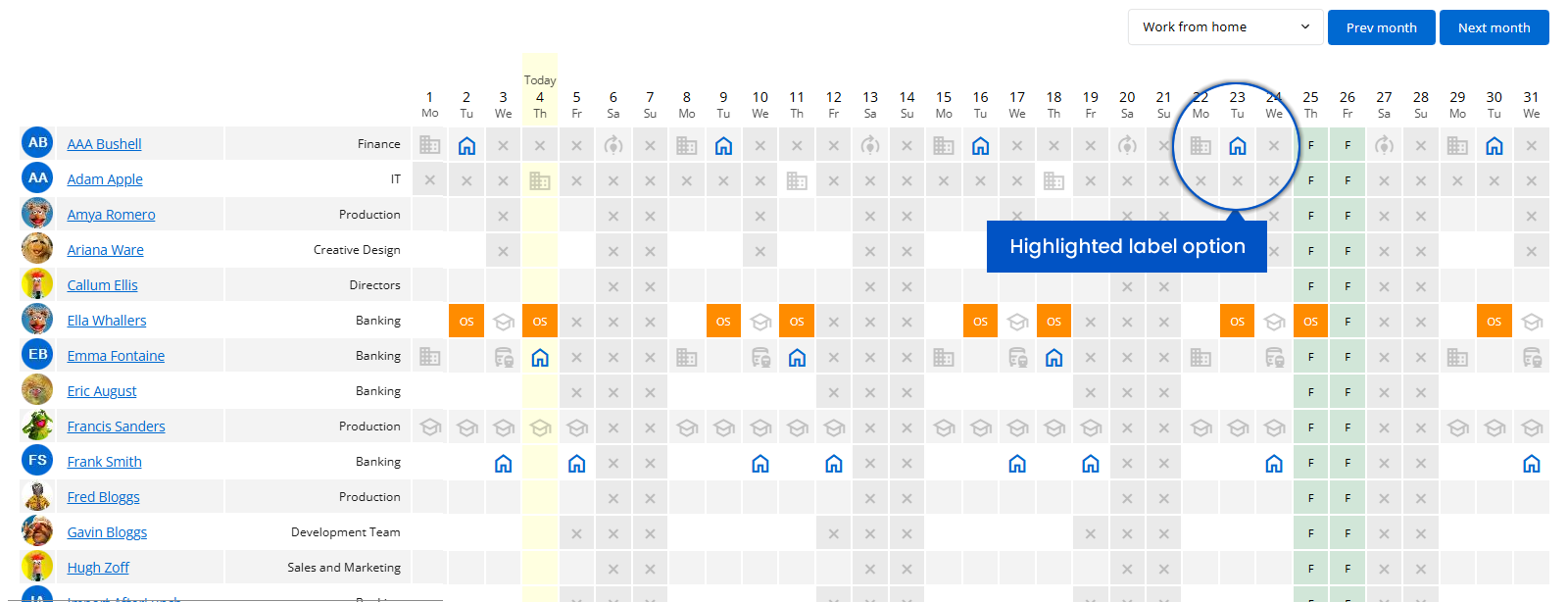
Using our latest feature, your WhosOff calendar can now be customised per staff member to easily identify these days, giving you at a glance, where everybody should be.
On top of this, you can quickly identify on the WhosOff calendar, anyone Working from Home, or working at an alternative Office/Branch. Check out the screenshots below:
⚡A Calendar That’s 1,300x Faster
Yes, you read that right. The WhosOff calendar has had a full makeover, and it’s now up to 1,300 times faster. No more waiting around — just smooth, instant navigation.
🙃 Clearer allowances
Whether you are using the application to manage your own leave, or monitor leave of your staff members, we've introduced clearer identification of how much leave staff members have remaining on their yearly allowances.
From opening and remaining, to lieu time, carryover balances, and adjustments, it can be too much information to try and decipher just how much leave you actually have to book for the rest of the year, so we've made it much clearer.
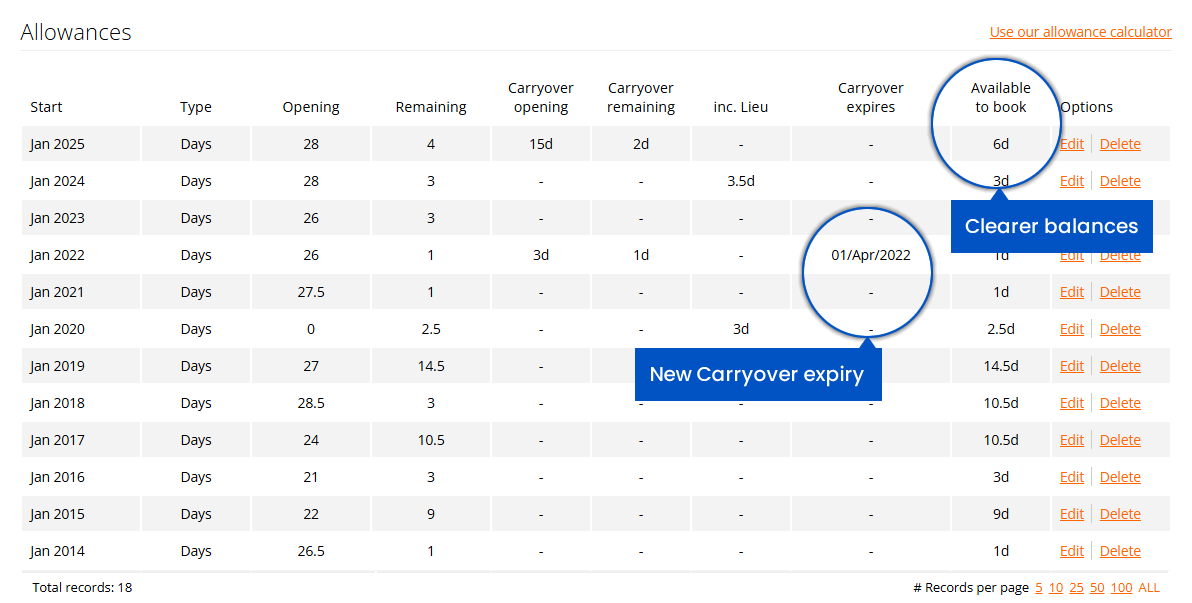
Keep an eye out on your dashboard, my leave, overtime, my staff, administration, and other areas, for the new column titled "Available to Book". The value in this field shows the exact amount you (or your staff) have left to book for the selected year, taking into account any pending leave, as well as the other values that can affect your running balance.
🗓️ Public holiday imports
We appreciate some companies operate across different countries around the world, and, within these countries some public holidays are specified down to regions. We've enhanced the public holiday import tool to take this into account! So, next time you're importing public holidays for your company, region(s), or department(s), you can now use the State/County/Region option to filter public holidays.
Currently, states/regions/counties of the following countries are supported:
- Australia
- Belgium
- Canada
- Germany
- New Zealand
- Slovak Republic
- Spain
- Switzerland
- United Kingdom, and
- United States
⚡Handy tip: Use our public and bank holiday lookup tool, available on our website, to see which Countries and States we make available to be imported.
⛔ Stopping concurrent leave requests
If your setup already restricts the number of days in which staff members can book leave in a single request, this is now also enforced by continuous bookings. As an example if you set that staff cannot take more than 5 consecutive days on a request, then they book the Monday to Wednesday off for next week, should they they proceed to try and book off the Thursday to Sunday of the same week, the system will block the request. As with all system settings, you, as Administrators, are able to override this for extenuating circumstances, should you wish to.
🛡️ Security enhancements
As the world of online security increases we're introducing a number of optional security measures that account administrators can enforce. Alongside the existing option of enforcing MFA (Multi Factor Authentication), the following can also be enforced now:
- Enforce extended password policy: An optional setting to decide whether users are required to adhere to the standard, or extended password policy. The extended policy requires users to specify passwords with at least 12 characters, with a minimum of 1 upper, 1 lower, 1 numeric and 1 special character.
- Enforce lockout policy: An optional setting allowing you to temporary lockout a user if they fail login attempts consecutively five times. The lockout period will last thirty (30) minutes.
🔜 The future...
Never one to rest on what's just been released, we're already working on the next set of updates to the WhosOff platform. These will include some, but not limited to, of the following:
- Multiple-approvers: Per staff member, handy for when first approvers are on leave.
- Approving / Declining leave: Making it easier from the WhosOff calendar.
- Reports dashboard: Re-shuffling the layout to highlight the most popular reports.
- Administration dashboard: Re-shuffling the layout to highlight the most popular functions used.
- Personnel records: Providing the ability to bulk import records.
- Enhanced calculations: Giving administrators more information and guidance when calculating allowances for staff members.
Keep a close eye on the WhosOff blog, or more importantly, make sure to log in to your account regularly, as one of the changes will see targeted messaging within the application, and this is where some of the features will be announced once live.
Of course you do, if you don't already have a WhosOff account, you're probably missing out! Sign up for your instant free trial and get up to 8-weeks to see how our easy-to-use leave planner is perfect for your business needs — no credit/debit card required, no obligation.
👉 Start your FREE WhosOff trial instantly


Similar articles
30.SEP.2026
Most businesses don't set out to buy leave management software - they start with a spreadsheet, or a shared Outlook calendar, and it works fine for a while. Then the balances stop adding up, two people get approved for the same week, and nobody's sure which file is actually current. Here's an honest, feature-by-feature comparison of spreadsheets, Outlook calendars, and dedicated leave management software - including exactly where each one starts to fall apart.
22.SEP.2026
Who's in, who's off, and when are they back? It sounds like a simple question - until sickness, holiday clashes, and a spreadsheet nobody's updated since last week make it anything but. Here's a full UK guide to what absence management software actually does, how it differs from leave management, and the rules worth knowing before you build (or fix) your process.
07.SEP.2026
A spreadsheet is fine when there are five of you. It's less fine when requests are arriving by email, WhatsApp, and sticky note, and nobody's quite sure who's actually off next week. Here's a practical look at why leave admin hits small businesses harder than most, and how to know when it's time for something better than a shared spreadsheet.
24.AUG.2026
Leave management looks simple on paper - until three people request the same week off, your busiest month collides with a holiday rush, and someone resigns with ten days still owed. These situations aren't exceptions; they're what HR actually deals with every week. Here's a practical look at the most common leave scenarios, and how the right process (and the right software) stops each one from becoming a headache.