

















Stop Managing Employee Holidays in Spreadsheets
Spreadsheets and email are the default way most UK businesses handle employee holiday management. But as your team grows, the cracks show fast - and the cost in time, errors, and team friction is higher than most HR teams realise.
Holiday requests lost in email
Requests sent by email get buried, overlooked, or replied to weeks later. Employees are left chasing an answer while the holiday they wanted disappears.
No reliable team holiday view
Without a shared holiday booking system, managers can't see at a glance who's off when. Clashes and understaffed days get discovered too late to fix.
Balance calculations that break
Spreadsheet formulas for bank holidays, part-time pro-rata, and carry-over constantly produce errors - meaning employees either take too much or miss out on holiday they're owed.
HR time wasted on admin
The average HR manager spends 2–4 hours per week on holiday admin that a proper holiday management system could handle automatically - for every single team member.
- Elton H., Operations Manager at Propel
2-4hrs
per week saved on holiday admin<1hr
to set up WhosOff for your team2,500+
companies already using WhosOff800k+
employee holidays trackedHoliday management that runs
itself - from first request to approval
WhosOff replaces every manual step in your holiday management process with a simple, automated workflow.
No more chasing, no more spreadsheets, no more end-of-year panic.
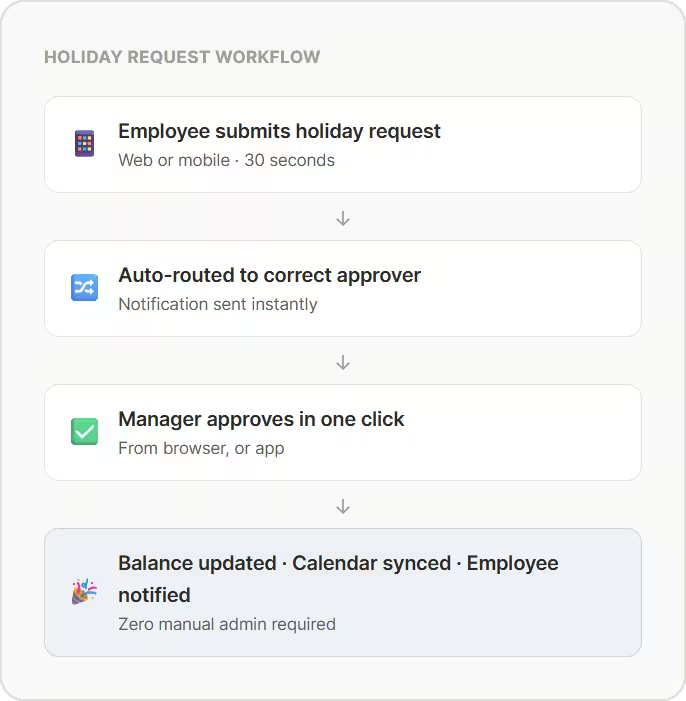
Employee submits a holiday request
Staff book holiday online or via the free mobile app in under 30 seconds. They can see their remaining balance, the team calendar, and any blackout periods before they submit - so requests are always realistic.
Request routes to the right approver automatically
WhosOff sends the request to the correct manager based on your configured approval chain. If approval stalls, reminders can be fired so nothing gets forgotten.
Manager approves or declines in one click
Managers review requests against the live team calendar and approve or decline from any device - browser, iPhone, or Android.
Balances and calendars update instantly
The moment a decision is made, the employee is notified, their balance adjusts automatically, the team calendar updates, and the entry syncs to any integrations the company has, including Google Calendar or Outlook - all without any manual input.
Everything employees and managers
need - in one holiday request system
Whether you're an employee booking a fortnight off or an HR manager overseeing 200 people across multiple sites,
WhosOff gives you exactly the tools you need - and nothing you don't.
Self-service holiday request software
Employees submit, and cancel holiday requests without involving HR. They always know their remaining balance, see which dates are already taken by colleagues, and get instant confirmation - all from their browser or the free WhosOff mobile app.
Shared team holiday calendar
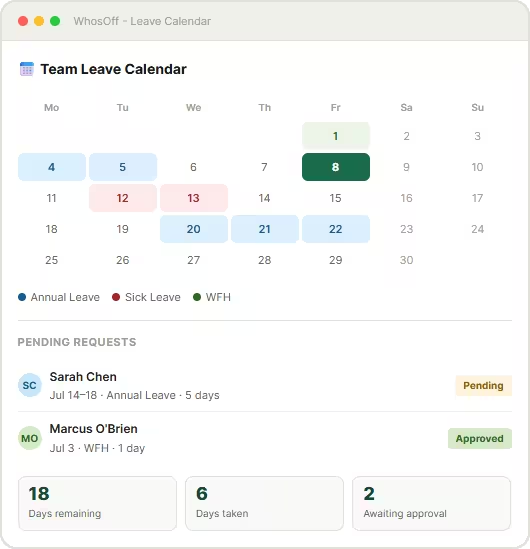
A real-time shared calendar shows every approved and pending holiday across your entire team. Managers can spot potential understaffing at a glance, enforce minimum cover rules, and prevent clashes - before they become a problem.
Automated notifications & reminders
Approval requests, decisions, and reminders are sent automatically by email, or mobile notification - so nothing sits waiting in a manager's inbox. Employees never have to chase, and managers never miss a request buried under other mail.
Free iOS & Android apps
The WhosOff mobile apps are free for every user on your account. Employees book holiday on the go. Managers approve from their phone. Everyone checks the team calendar without needing to be at a desk - ideal for field teams and remote workers.
Configurable holiday policies
Set minimum notice periods, blackout dates, maximum concurrent leave rules, and approval flows - all enforced automatically when employees submit requests. Your HR holiday booking system works within the rules you set.
Google Calendar & Outlook sync
Approved holidays sync automatically to Google Calendar, Microsoft Outlook, and Apple Calendar - so teams always know who's off without leaving the tools they use every day. No exports, no copy-pasting, no missed updates.
The best holiday management software UK teams have relied on since 2005
Fully cloud-based, zero installation
WhosOff runs entirely in the cloud. Sign up today and your employee holiday booking system is live within the hour - no software to install, no servers, no IT department.
Built for UK holiday rules
UK public holidays, full-time and pro-rata entitlements are all built in. WhosOff handles the compliance complexity so you don't have to.
Scales from 5 to 5,000 employees
WhosOff works for small businesses and large enterprises alike. Multiple departments, teams, and regions are all supported from one central HR holiday booking system.
Real UK-based support
Our Canterbury-based team answers calls and emails Monday to Friday, 9am–5.30pm. No bots, no offshore queues - real people who know the product inside out.
WhosOff at a glance
2,500+
companies using WhosOff800k+
employees managed20 yrs
in business since 20054.4★
Capterra review score- Up to 8 weeks FREE trial
- No credit card required
- No setup fee or long-term contract
- All features unlocked from day one
- UK-based support included
- Cyber Essentials certified
- G-Cloud Crown Commercial Services supplier
Every employee knows exactly how much holiday they have left
WhosOff tracks holiday balances in real time, for every employee, automatically. No more employees emailing HR to ask how many days they have left. No more year-end reconciliation nightmares.
Real-time balance updates
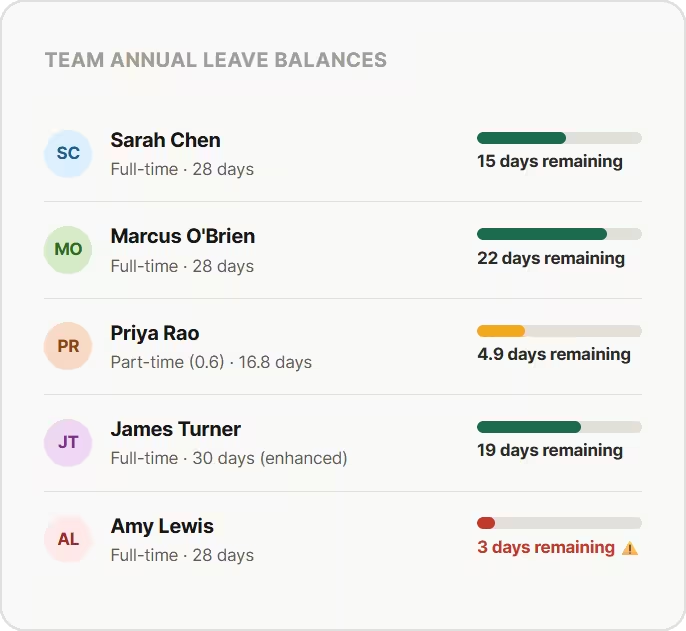
Every holiday approval instantly adjusts the employee's balance. Employees always see the right number - no lag, no recalculation, no manual update needed.
Pro-rata for part-time staff covered
WhosOff allows for annual leave entitlement for part-time workers based on their contracted hours - just enter the allowance and let WhosOff do it's job.
Carry-over rules enforced at year-end
Set your carry-over policy once - maximum days, expiry dates - and WhosOff applies it at the beginning of the leave year with simple interaction from HR.
Low balance warnings
Managers can track when an employee's holiday balance is running critically low - helping prompt staff to take their entitlement before the year-end deadline.
Holiday reports that HR and payroll teams actually need
WhosOff generates accurate, detailed holiday reports at the click of a button - filtered any way you need, exported in seconds, and always based on live data rather than a spreadsheet someone last updated three weeks ago.
Holiday taken & remaining by employee
Run a report showing exactly how many holiday days each employee has taken and how many they have left - across any date range, filtered by team or department. Essential for year-end planning and payroll reconciliation.
Absence trends & patterns
Identify patterns in holiday uptake across your organisation - who's not taking enough leave (a wellbeing risk), which teams are under pressure, and whether holiday is being distributed evenly through the year.
Payroll-ready holiday data
Export holiday data by pay period in CSV or XLSX format, formatted for direct use with your payroll provider. Eliminate manual reconciliation and stop payroll errors caused by out-of-date leave records.
Full audit trail for HR & compliance
Every holiday request, approval, decline, and cancellation is logged with a timestamp and the name of the person who took the action. Your complete holiday history is always exportable and ready for an audit or tribunal.
Every report is available instantly - no waiting, no manual preparation, no pivot tables.
Spreadsheets vs WhosOff:
the honest holiday management comparison
If your team is still managing employee holidays by email and spreadsheet, here's a clear picture of what that's actually costing you - and what changes when you switch.
| Holiday management task | Spreadsheet | WhosOff |
| Submit a holiday request | ✗ Email manager, update spreadsheet manually | ✓ Self-service online in under 30 seconds |
| Approve or decline a request | ✗ Reply to email, update two spreadsheet | ✓ One click from any device - browser, iPhone, Android |
| Check remaining holiday balance | ✗ Email HR and wait; or check the spreadsheet yourself | ✓ Visible to every employee, always accurate and live |
| See who's off across the whole team | ✗ Shared spreadsheet, usually out of date | ✓ Real-time team calendar, accessible from any device |
| Prevent clashes & understaffing | ✗ No automatic checks - discovered too late | ✓ Team calendar flags overlaps; cover rules enforced |
| Carry-over at year-end | ✗ Manual adjustment per employee every year | ✓ Policy-driven, applied simply |
| Holiday data for payroll | ✗ Manual pivot table reconciliation | ✓ One-click CSV or XLSX export, payroll-ready |
| Audit trail for HR compliance | ✗ No log of who changed what or when | ✓ Full timestamped history, always exportable |
| Mobile access for employees | ✗ Spreadsheets not designed for mobile | ✓ Free iOS & Android apps for all users |
| Weekly HR time on holiday admin | ~ 2–4 hours per week | ✓ Under 20 minutes per week |
2,500+ teams have switched to
WhosOff for employee holiday management

"We now have greater accessibility across shifts with increased accuracy and visibility"
HR Manager
"If you’re thinking of moving to an online holiday planner, I’d advise you to do it sooner rather than later!"
Director
"WhosOff was a no-brainer for us, as everyone can easily access the system and see each other’s availability"
Content Manager
2,500+
Companies using WhosOff800,000+
Employees managed4.4★
Average review score20 yrs
in business since 2005Holiday management software
questions, answered
Common questions about WhosOff as your employee holiday booking system.
What is holiday management software?
What's the best holiday management software for UK businesses?
How does an employee holiday booking system work in WhosOff?
Can WhosOff act as an HR holiday booking system for multiple departments?
Does WhosOff handle UK bank holidays automatically?
Can employees see the team holiday calendar before booking?
Does WhosOff integrate with Google Calendar and Microsoft Outlook?
What holiday reports does WhosOff produce?
Is there a free trial of WhosOff holiday software?
How quickly can we get WhosOff set up for our team?
Ready to Simplify Holiday Management?
Join over 2,500 UK companies that have replaced spreadsheets and email with WhosOff - the holiday management software that handles everything automatically, so you don't have to.
Prefer to talk? Call +44 (0)1227 812932 or email our team - Mon-Fri, 9am-5.30pm