

















Stop Managing Leave in Spreadsheets
Spreadsheets weren't designed for leave management. They break, they go missing, and they leave managers chasing approvals over email. There's a better way.
Version control chaos
Who updated the spreadsheet last? Which copy is current? Manual tracking means conflicting data and errors that go unnoticed until it's too late.
Approval by email
Requests buried in inboxes, approvals forgotten, no audit trail. Managers spend hours each month on admin that should take minutes.
No visibility across teams
When half the department books the same week off, you don't find out until it's a crisis. Spreadsheets can't show the full picture at a glance.
Manual balance calculations
Carry-overs, part-time accruals, half-days - spreadsheet formulas break constantly, and recalculating manually wastes hours of HR time.
- Elton H, Operations Manager at Propel
Every feature maps to a real problem you already have
WhosOff is an automated leave management system that replaces manual processes with smart, self-running workflows, so HR and managers get their time back.
Online leave requests
Employees submit requests in seconds, via online or mobile app. Managers approve with one click from any device, anywhere.
Automated workflows
Requests route to the correct approver automatically. No more chasing, no missed emails, no bottlenecks.
Real-time leave tracking
Every employee sees their exact balance, every manager sees who's off when - always up to date, no manual input needed.
Everything you need to run
leave management properly
Manage Leave Requests Online
Employees request leave from any browser or mobile device. Managers receive instant notifications and approve or decline with a single click - no paperwork, no email thread, no delay.
Track Leave Balances Automatically
Entitlements, carry-overs, part-time accruals, and public holiday adjustments are calculated automatically. Every employee always knows exactly how much leave they have left.
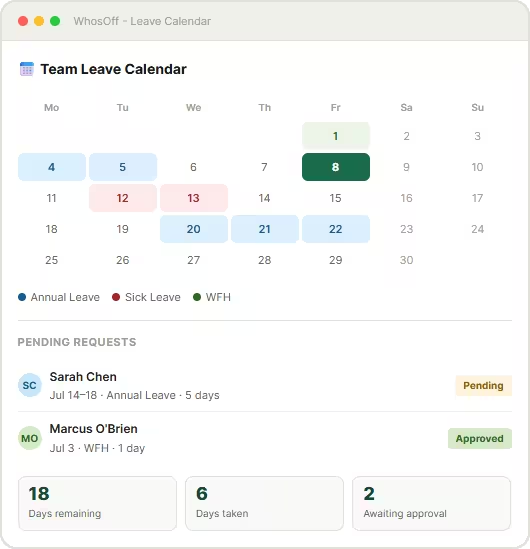
Team Leave Calendar
A single shared calendar shows exactly who's off, when, and why - across every team and location. Available online as well as on the dedicated WhosOff mobile apps. Spot conflicts before they happen.
Smart Notifications & Reminders
Automatic email and webhook notifications keep everyone in the loop. Approval reminders stop requests falling through the cracks, and employees are notified the moment a decision is made.
Reporting & Analytics
Generate detailed leave reports by team, employee, leave type, or date range. Export data for payroll, identify absence trends, and make informed decisions with real data - not guesswork.
Cloud-Based & Always Accessible
As a fully cloud-based leave management system, WhosOff needs no installation, no server maintenance, and no IT department. Access it from any device, any location, at any time.
Spreadsheets vs WhosOff: an honest comparison
See exactly what changes when you move from manual processes to a purpose-built leave management tool.
| Capability | Spreadsheets | WhosOff |
| Submit a leave request | ✗ Email + manual update | ✓ Online in under 30 seconds |
| Approve or decline requests | ✗ Reply to email thread | ✓ One click from any device |
| See real-time team availability | ✗ Out of date instantly | ✓ Live team calendar, always current |
| Automatic balance calculations | ✗ Manual formulas that break | ✓ Fully automated, error-free |
| Mobile access | ✗ Not designed for mobile | ✓ Native mobile app experience |
| Audit trail & compliance records | ✗ No history or accountability | ✓ Full log of every request & decision |
| Leave reporting & analytics | ✗ Manual pivot tables | ✓ One-click reports, payroll-ready |
| Multi-department & multi-location | ✗ Separate files per team | ✓ All teams in one system |
| Calendar integrations (Google, Outlook) | ✗ Manual export | ✓ Automatic two-way sync |
| Setup time | ~ Hours to build, days to train | ✓ Up and running in under an hour |
2,500+ teams have already
made the switch

"We now have greater accessibility across shifts with increased accuracy and visibility"
HR Manager
"WhosOff was a no-brainer for us, as everyone can easily access the system and see each other’s availability"
Content Manager
"If you’re thinking of moving to an online holiday planner, I’d advise you to do it sooner rather than later!"
Director
2,500+
Companies using WhosOff800,000+
Employees managed4.5★
Average review score2hrs
Avg. setup timeFrequently asked questions
Everything you need to know about WhosOff as your leave management system.
What is leave management software, and do I really need it?
Is WhosOff a cloud-based leave management system?
How long does it take to set up?
Can employees request leave from their phone?
How does the automated leave management system handle different leave types?
Does WhosOff integrate with Google Calendar and Outlook?
What reporting does the leave administration software provide?
Is there a free trial? What happens when it ends?
How is WhosOff priced?
Ready to Simplify Leave Management?
Join over 2,500 companies that have replaced spreadsheets and email chains with WhosOff, the leave management software built for teams that want to move faster.