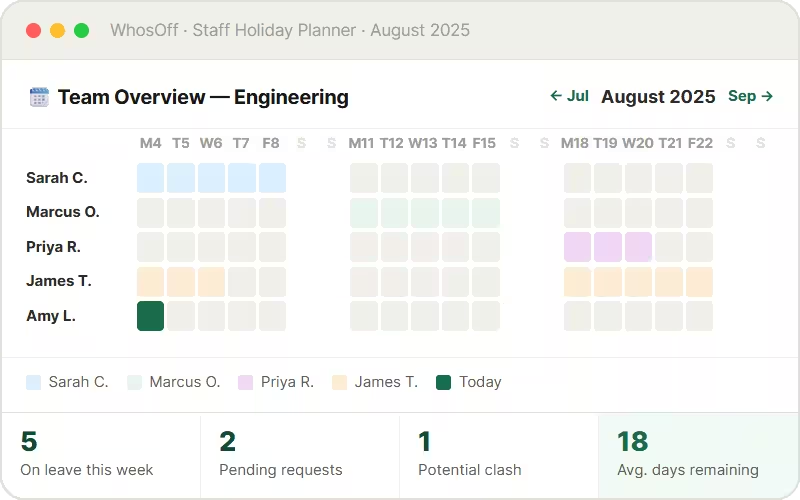


















Your holiday spreadsheet is costing you more than you think
A shared Excel or Google Sheet might feel like a free staff holiday planner - but the hidden costs in HR time, data errors, and planning failures add up to far more than the software to replace it.
Multiple versions, zero trust
Who updated the planner last? Did they save it? Is the shared drive version the same as the one emailed around? Spreadsheet-based planners are only reliable until someone edits them - which is immediately.
Clashes discovered too late
Without real-time visibility, managers only spot understaffing when it's already a crisis. An office holiday planner in a spreadsheet can't alert you before a clash - it just records one after the fact.
Not built for modern teams
Remote workers can't easily update a shared spreadsheet. Mobile access is clunky. There's no notification when someone books a week you needed covered. Spreadsheets weren't designed to be a team holiday planner for employees.
Manual maintenance every week
Someone has to update the spreadsheet, reformat for the new year, recalculate balances, and email the latest version around. That's 2–4 hours of HR admin every week that should take minutes.
- Roy L, Head of IT
✗ Manual updates only
✗ Version conflicts
✗ No clash detection
✗ No mobile access
✗ Balances break
✗ No approval trail
✓ Real-time updates
✓ Single source of truth
✓ Clash alerts built in
✓ Free mobile apps
✓ Auto balance tracking
✓ Full audit log
Everything a modern company holiday
planner needs - in one place
WhosOff gives every team - from five people to five thousand - an accurate, always-current staff holiday planner that runs itself. No spreadsheet maintenance, no email chains, no surprises.
Shared team holiday calendar
Every approved and pending holiday is visible on a shared calendar - by day, week, or month. Employees see their team's availability before they book. Managers see the full picture across every team, department or region.
Self-service holiday requests
Employees submit holiday requests from any browser or the free mobile app in seconds. Managers approve with one click. No emails to write, no spreadsheets to update - it all happens automatically.
Automatic entitlement tracking
Every employee sees their exact holiday balance, updated the moment a request is approved. WhosOff handles pro-rata for part-time staff, carry-over rules, and bank holiday deductions automatically, no more guess work!
Instant notifications & reminders
Managers receive instant alerts when a holiday request lands. Employees are notified the moment a decision is made, whether it's approved or declined. Approval reminders can be sent if requests are left waiting - nothing slips through.
One-click holiday reports
Generate holiday reports by employee, team, or department in seconds - filtered by date range and exportable to CSV or XLSX. Essential for payroll, year-end planning, and spotting who hasn't taken their holiday allocation.
Free iOS & Android Apps
Your work holiday planner goes wherever your team goes. Employees book from their phone, managers approve on the move, and everyone can check the shared team calendar from any device without logging into a computer.
Know who's off before it's too late to do anything about it
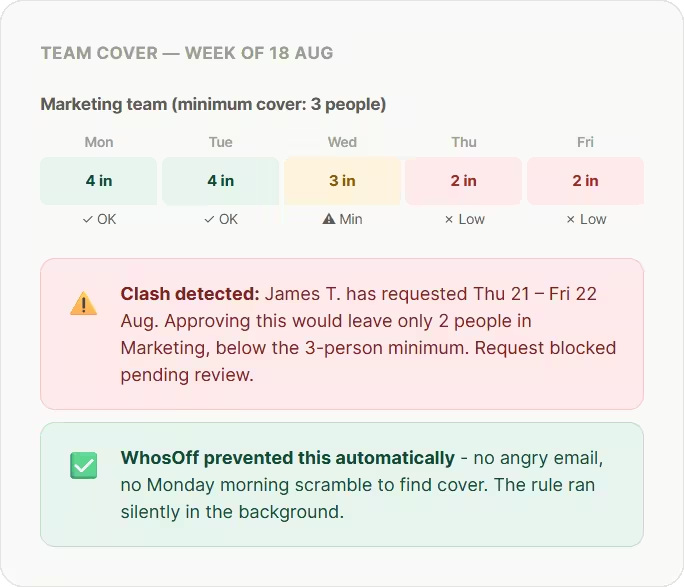
The biggest frustration with any staff annual leave planner is discovering a clash after it's already been approved. WhosOff solves this at the source - before employees even submit their request.
Employees see team availability before booking
When an employee opens the holiday request form, the shared team calendar is right there. They can see which dates are already taken, choose a different week if needed, and avoid a clash before it ever happens.
Minimum cover rules enforced automatically
Set a minimum number of people who must be in for a team/department. WhosOff enforces this rule automatically - blocking or flagging requests that would breach it, before the manager even sees them.
Blackout periods for busy times
Lock out specific dates - quarter-end, peak season, company events - so employees can't request holiday during periods when you need everyone in. Rules apply automatically without any manual management.
Clear threshold monitoring
Managers can easily see when a team's availability drops below a safe threshold - giving enough lead time to find cover, adjust plans, or reach out to staff before a staffing gap becomes a crisis.
The staff holiday planner UK teams have trusted for over 20 years
Built for UK teams and UK rules
UK public holidays, allowances allow for statutory minimums, ensuring Working Time Regulations are met. WhosOff handles the compliance complexity so you don't have to.
Cloud-based - nothing to install
Your online staff holiday planner is live within the hour. No software installs, no server costs, no IT involvement. Sign up, import your team, and you're ready to plan.
Syncs with Google Calendar & Outlook
Approved holidays appear automatically in Google Calendar, Outlook, and Apple Calendar - so your team always knows who's off without switching tabs or logging into another system.
Real people, UK-based support
Our Canterbury team answers calls and emails Monday to Friday, 9am–5.30pm. No chatbots, no overseas queues - real support from people who know WhosOff inside out.
WhosOff at a glance
2,500+
companies using WhosOff800k+
employees managed4.4★
average review score20 yrs
in business since 2005- Up to 8 weeks FREE trial
- No credit card required
- No setup fee or long-term contract
- All features unlocked from day one
- UK-based support included
- Cyber Essentials certified
- G-Cloud Crown Commercial Services supplier
One calendar. Every holiday.
Every team. Always current.
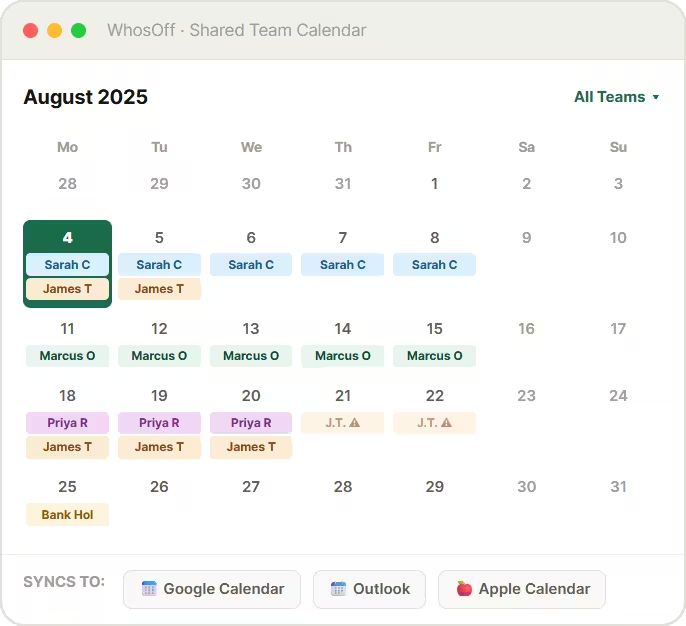
The WhosOff shared calendar is the heart of your office holiday planner. It shows every approved and pending holiday across every team, updates in real time, and syncs automatically to the calendars your team already uses.
Clear month view
Get a monthly oversight of your team, or company, giving you the clearest picture for planning upcoming holidays and managing staffing. No more messing with weekly views.
Filter by team, department, or location
Large organisations can filter the shared calendar to show just their department, a single team, or a specific office location - so managers see relevant holidays, not 500 entries they don't need.
Pending requests shown in real time
Pending holiday requests appear on the calendar instantly - so managers can see the full picture before approving, and colleagues can see who's planning to be off even before it's confirmed.
Auto-syncs to Google, Outlook & Apple Calendar
Every approved holiday syncs to external calendar feeds automatically. No exports, no manual entries - just an always-up-to-date employee holiday planner visible from the tools your team uses every day.
Excel holiday planner vs WhosOff:
an honest side-by-side
If you're comparing your current spreadsheet-based staff holiday planner to WhosOff, here's exactly what changes - and what you stop doing manually.
| Holiday planning task | Excel / Google Sheets | WhosOff |
| View who's off across the whole team | ✗ Shared file - often out of date | ✓ Real-time shared team calendar, always accurate |
| Submit a holiday request | ✗ Email manager, update spreadsheet manually | ✓ Self-service - online or mobile, under 30 seconds |
| Approve or decline requests | ✗ Reply to email, update at least two places | ✓ One click from any device - instant notification sent |
| Detect and prevent holiday clashes | ✗ No automation - discovered after approval | ✓ Clash detection and minimum cover rules run automatically |
| Track each employee's balance | ✗ Formula-driven - breaks when patterns change | ✓ Real-time, automatic - visible to every employee |
| UK bank holiday management | ✗ Entered manually each year | ✓ Built-in by region, applied with a single-click |
| Carry-over at year-end | ✗ Manual row-by-row adjustment | ✓ Policy-configured, HR applied |
| Mobile access for staff | ✗ Awkward on mobile, editing unreliable | ✓ Free iOS & Android apps for all users |
| Sync to Google Calendar or Outlook | ✗ Manual export or import | ✓ Automatic sync, no action required |
| Holiday reports for payroll | ✗ Manual pivot tables, reconciled by hand | ✓ One-click CSV or XLSX export, payroll-ready |
| Time spent maintaining the planner | ~ 2–4 hours per week | ✓ Under 20 minutes per week |
2,500+ teams have switched
to WhosOff for annual leave

"We now have greater accessibility across shifts with increased accuracy and visibility"
HR Manager
"If you’re thinking of moving to an online holiday planner, I’d advise you to do it sooner rather than later!"
Director
"WhosOff was a no-brainer for us, as everyone can easily access the system and see each other’s availability"
Content Manager
2,500+
Companies using WhosOff800,000+
Employees managed4.4★
Average review score20 yrs
in business since 2005Staff holiday planner
questions, answered
Common questions about replacing your spreadsheet with WhosOff as your online staff holiday planner.
What is a staff holiday planner?
Can WhosOff replace our Excel or Google Sheets holiday planner?
What's the difference between a staff holiday planner and leave management software?
How does WhosOff prevent holiday clashes?
Is WhosOff suitable as a company holiday planner for large organisations?
Can employees see the team holiday planner before submitting a request?
Does WhosOff sync with Google Calendar and Microsoft Outlook?
How long does it take to set up WhosOff for my team?
Is there a free trial of WhosOff's staff holiday planner?
Ready to Replace Your Holiday Spreadsheet?
Join over 2,500 UK companies that have switched to WhosOff - the staff holiday planner that prevents clashes, tracks every balance automatically, and keeps your whole team in sync.
Prefer to talk? Call +44 (0)1227 812932 or email our team - Mon-Fri, 9am-5.30pm