
To coincide with the launch of our new mobile apps, we have made branding FREE
To coincide with the launch of our new mobile apps, we have made branding available to all accounts on WhosOff, now you can make WhosOff look and feel like one of your own internal products.
By allowing the administrators of the account access to change the branding, we believe that this will make using WhosOff more comfortable with employees. The branding will be effective on both the web and mobile applications, as well as the emails that will be generated from within the system for any requests that will be made.
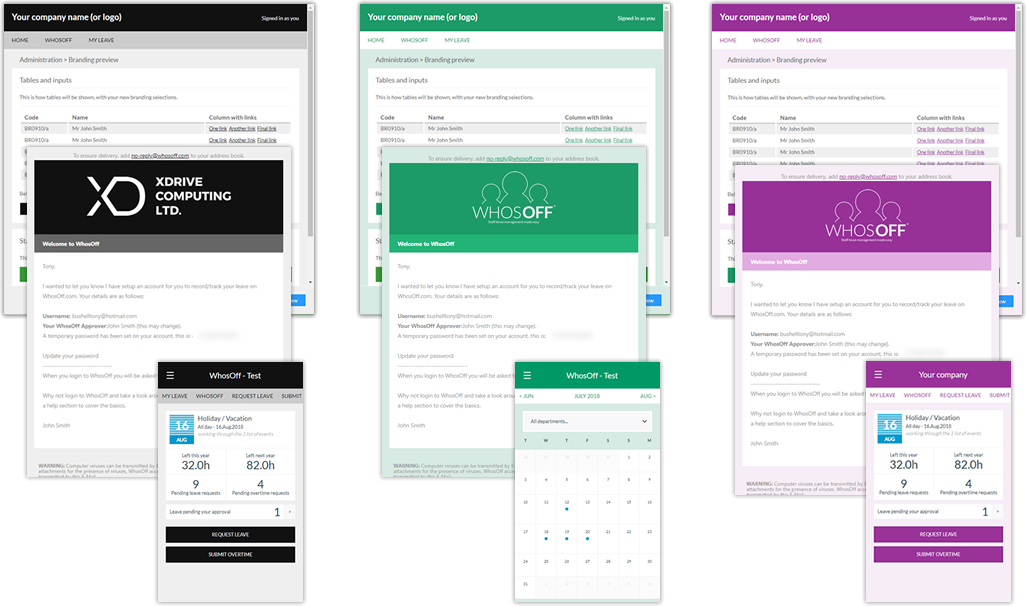
Your account. Your Style. Your Control
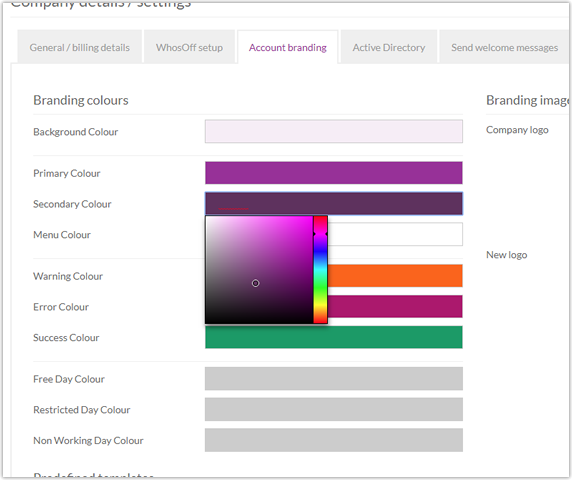
To start branding your WhosOff account, simply login to your Administrator account, then from the Administration menu, select "Company Details". Once on the resulting page, click on the "Account branding" tab and play.
Either choose from a list of predefined template colours, or select your own using the colour pickers provided, have some fun with it!
My company already pays for branding, what do we do?
Our current "corporate" branded customers are able to access the FREE branding option by contacting our support team, however, the FREE branding option does not come with the customisation that our branding team would have applied to your account.


Similar articles
07.SEP.2026
A spreadsheet is fine when there are five of you. It's less fine when requests are arriving by email, WhatsApp, and sticky note, and nobody's quite sure who's actually off next week. Here's a practical look at why leave admin hits small businesses harder than most, and how to know when it's time for something better than a shared spreadsheet.
24.AUG.2026
Leave management looks simple on paper - until three people request the same week off, your busiest month collides with a holiday rush, and someone resigns with ten days still owed. These situations aren't exceptions; they're what HR actually deals with every week. Here's a practical look at the most common leave scenarios, and how the right process (and the right software) stops each one from becoming a headache.
03.AUG.2026
Office-based leave management is easy - until your team isn't all in one office. Add remote workers, multiple sites, or a genuinely hybrid schedule, and "who's actually off this week?" stops being a simple question. Here's what to look for in leave management software built for distributed teams, and how to stop spreadsheets from quietly falling out of sync.
20.JUL.2026
Still juggling leave requests through email and a shared spreadsheet? You're not alone - but it's costing you more than you think. With so many leave management tools on the market, picking the right one isn't about finding the flashiest feature list. It's about finding software your team will actually use.