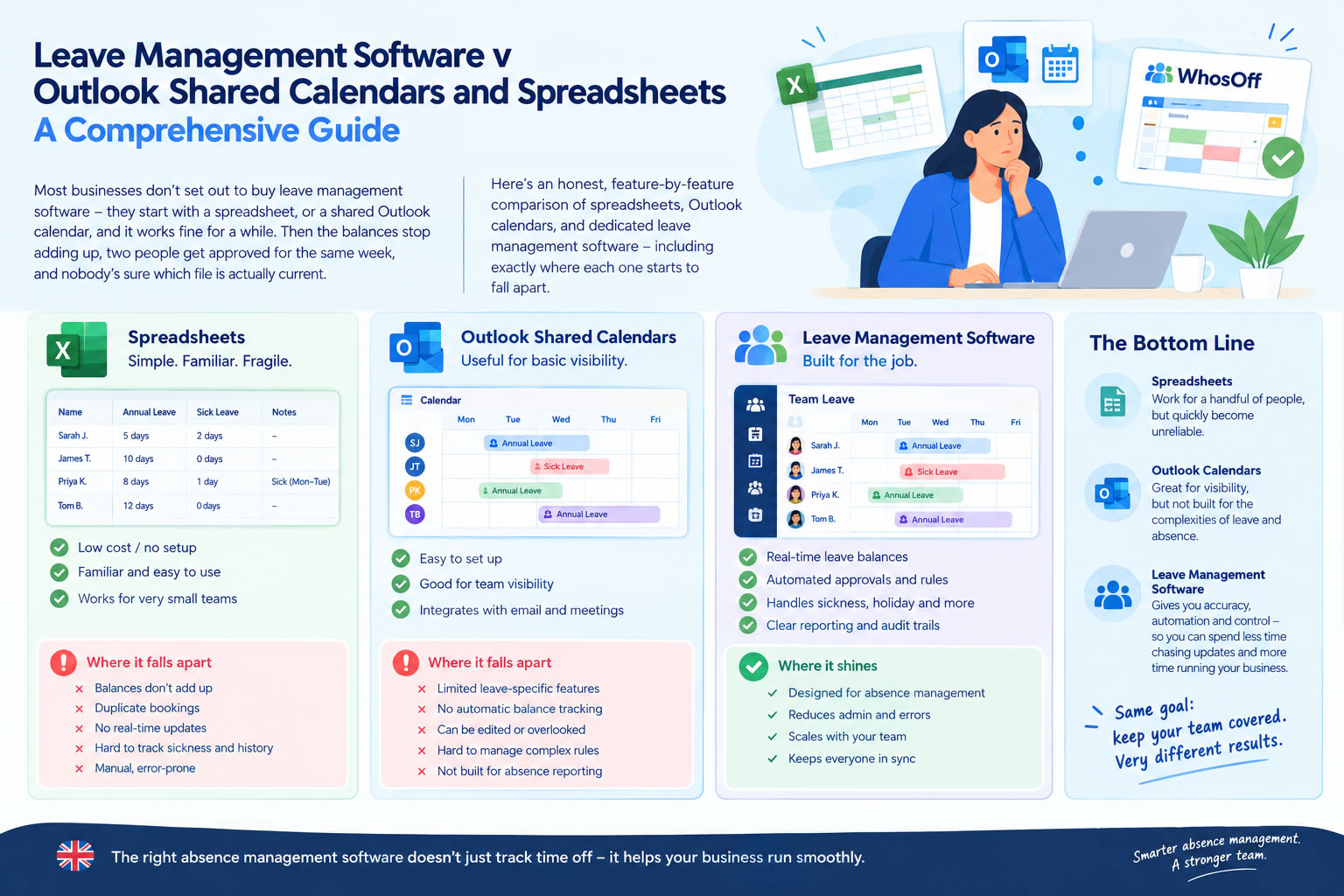
Most businesses don't start out looking for leave management software. They start with a spreadsheet.
Someone creates a column for each employee, adds a few formulas, colours the summer holidays yellow, and saves it somewhere everyone can get to. Or the team uses a shared Outlook calendar instead: employees add their holidays, managers can see who's away, and for a while everything seems perfectly manageable.
It usually is, for a while.
The problems tend to show up gradually. The spreadsheet falls a few days out of date. Someone forgets to add their holiday to Outlook. A manager approves two people from the same team without noticing the clash, and nobody's entirely sure whether the number in the "remaining holiday" column is still right.
At that point, most businesses face a choice: patch up the spreadsheet or the shared calendar you've already got, or move to something built specifically for managing leave. Here's how the two approaches actually compare.
The three common ways businesses manage employee leave
Most businesses running a manual or semi-manual process fall back on one of three approaches.
Spreadsheets, usually Excel or Google Sheets. A typical holiday tracker lists employee names, allowances, holidays taken and what's left, and more sophisticated versions add formulas, separate tabs per department, colour coding and something resembling a calendar view. The appeal is obvious: everyone already has access to one, and someone in the business usually knows enough Excel to knock together a basic tracker in an afternoon.
Outlook shared calendars. For a business already running Microsoft 365, putting staff holidays on a shared calendar feels like the natural next step. Employees or managers add leave to it, and everyone can see at a glance who's away before arranging a meeting or approving a request. For a small team, that visibility alone is genuinely useful.
Dedicated leave management software takes the process further. Rather than just recording that someone is off, it manages what happens around that absence; the request goes to the right manager, availability gets checked, a decision is logged, the allowance updates, and the calendar changes to match. All three options can tell you that Sarah is off next Friday. Only one of them is built to handle everything that has to happen before and after that fact shows up on a calendar.
Spreadsheets: simple, flexible, familiar
Spreadsheets are where most businesses start, for good reason. They're cheap, flexible, and need almost no setup. If you've got five employees working out of one office, a spreadsheet is probably fine, you can build something usable in an afternoon and tweak it whenever you need to.
The catch is that a spreadsheet only works as well as the people maintaining it. Somebody has to enter every request, check the allowance, check who else is off that week, update the balance, note whether it was approved, fix the inevitable mistakes, and make sure everyone's actually looking at the current version rather than an old one sitting in their downloads folder. With five or ten employees, that's a few minutes a week. With a hundred, it's a job in itself.
Where holiday spreadsheets start to struggle
The spreadsheet itself is rarely the issue. It's everything around it.
A spreadsheet has no idea that Dave emailed his manager yesterday asking for next Friday off, it only knows once somebody types it in, which leaves a gap between what's actually happening and what the file says is happening. That gap is where most of the problems start.
Holiday calculations get messier than they look at first. An allowance is simple enough to track until someone joins halfway through the year, someone else leaves, a third person drops to three days a week, and a fourth carries unused leave into the next holiday year. Before long the spreadsheet is running on formulas that only one person in the building really understands, and you'd rather not find out what happens if they're off sick the week payroll needs the numbers.
Version control causes its own headaches. Holiday Planner.xlsx, Holiday Planner NEW.xlsx, Holiday Planner FINAL.xlsx, Holiday Planner FINAL v2.xlsx etc. Most HR teams have lived through some version of that file chain. Cloud spreadsheets have made this less painful than it used to be, but they don't fix the underlying issue: the whole system still depends on someone entering things correctly, every time.
Approval history tends to get thin, too. Who approved the leave, and when? Was the original request Monday to Wednesday, or Monday to Thursday? Did anyone actually tell the employee? You can build fields for all of that into a spreadsheet, but every field you add is one more thing somebody has to remember to fill in.
What about an Outlook shared calendar?
A shared Outlook calendar solves the biggest weakness of a spreadsheet: you can actually see who's off without opening a separate file. If your organisation lives in Outlook already, putting holidays there makes obvious sense, and for a small team that's often all you need.
There's a real difference, though, between a leave calendar and a leave management system. A calendar is good at showing an event. It isn't designed to manage the process that produced it.
Take an employee who wants the first week of August off. They add it to the shared calendar, which seems simple enough on the surface. But has the leave actually been approved, and by whom? How much of their annual entitlement is left? Are three other people from the same department already booked off that week? Does the business have a blackout period covering those dates? If the request gets declined after it's already on the calendar, who removes it?
Outlook can be bent into supporting parts of that process. The more rules and administration you bolt on, though, the further you get from what a shared calendar was ever meant to do. It shows an event. It isn't an HR workflow.
The trouble with running Outlook and a spreadsheet side by side
This is where a lot of businesses land. The spreadsheet tracks allowances, Outlook shows who's away, and email carries the requests and approvals. On paper, everything's covered. In practice, you've now got three separate systems all describing the same thing, and they only agree with each other if every single handoff between them goes right.
An employee emails a request. Their manager approves it by reply. Someone updates the spreadsheet. Someone else adds the dates to Outlook. When all four steps happen, the records line up. Miss one, and they don't: the spreadsheet says the employee is working, Outlook says they're away, the manager remembers approving it, and HR can't find the email that proves it. Nobody's done anything wrong, particularly, the process just has too many manual steps for the records to stay honest indefinitely.
What dedicated leave management software does differently
The real difference isn't the calendar. It's the workflow sitting behind it.
An employee submits a request, it reaches the right manager, that manager can see team availability before deciding, and the decision gets logged. The employee is notified, their balance updates, the calendar updates, and there's a record of exactly what happened and when, all without anyone manually keeping three separate systems in sync.
Leave management software v spreadsheets v Outlook: the key differences
| Feature | Spreadsheet | Outlook shared calendar | Leave management software |
| See who's off | Yes | Yes | Yes |
| Track holiday allowances | Yes, manually/formulas | Limited | Yes |
| Employee self-service | Limited | Limited | Yes |
| Formal approval workflow | Manual | Limited | Yes |
| Automatic allowance updates | Formula-dependent | No | Yes |
| Approval history | Manual | Limited | Yes |
| Leave restrictions | Manual | Limited | Yes |
| Multiple leave types | Yes, manually | Yes, manually | Yes |
| Reporting | Manual | Limited | Built in |
| Mobile leave requests | Limited | Calendar access | Yes |
| Automatic notifications | Limited | Calendar notifications | Yes |
| Manage larger teams | Increasingly difficult | Increasingly difficult | Designed for it |
| Integrate with Outlook | N/A | Native | Yes |
Spreadsheets and Outlook can both perform most of these tasks individually, that was never really in question. What changes is how much manual effort it takes to stitch those individual tools into a complete leave management process.
What happens when the team grows
Picture a company with eight employees. Everyone knows everyone, there's one manager signing off holidays, and people can generally remember who's away without checking anything. A spreadsheet and a shared calendar handle that comfortably.
Now picture the same business at sixty employees across five departments: several managers, a mix of part-time staff, different minimum staffing levels per team, different holiday allowances, overlapping requests, people joining and leaving throughout the year, some working remotely and others split across sites. The admin doesn't just grow in proportion to headcount, the complexity compounds. That's usually the point where a system built specifically for managing leave starts to earn its place.
Employee self-service matters more than it sounds
With a spreadsheet, an employee who wants to know their remaining allowance usually has to ask someone. With an Outlook calendar, they can see who else is away, but that doesn't tell them anything about their own balance. Dedicated software gives employees access to their own information directly, they can check their allowance, see who else is off, and put in a request without going through anyone else.
That sounds minor on its own. Multiply the "how many days have I got left?" question across an entire workforce over a full year, though, and it adds up to a fair amount of admin that simply stops happening once people can answer it themselves.
Two people, the same week
With a spreadsheet, the manager opens the file and checks. With Outlook, they check the calendar. If the business runs both, they might check both and still miss something. With dedicated leave management software, availability sits right alongside the request itself, and businesses can go further by setting rules; no more than two people from a department off at once, say, or no annual leave during a particular busy period, so the system enforces the policy instead of relying on every manager remembering it unprompted.
Which option gives you the best reporting?
Spreadsheets look strong here at first glance. Excel is genuinely powerful, and if you know what you're doing, you can build pivot tables and charts covering almost anything. The catch is that a report is only as reliable as the data entered into it, and someone still has to build and maintain that report every time.
Outlook was never designed for absence reporting, so it's limited by nature. Dedicated software records structured leave data from the start, which means reports on leave usage, allowances, absence levels or patterns by team don't need building from scratch each time someone asks for one.
Sickness and everything else that isn't annual leave
Annual leave is rarely the only reason someone isn't at their desk. There's sickness, compassionate leave, maternity and paternity leave, medical appointments, unpaid leave, training, TOIL, and whatever else is specific to your business. You can track all of it in a spreadsheet, or in Outlook, but the same issue applies: what happens to that information afterwards. A dedicated system records every type of absence consistently and reports on it centrally, without another tab, another file or another colour code.
Does leave management software replace Outlook?
Not necessarily, and this is worth being clear about. It isn't a choice between a proper leave system or keeping leave visible in Outlook, the two work fine together. WhosOff, for instance, integrates with Outlook, so businesses can run the actual leave process through dedicated software while absence still shows up in the calendar employees already check every day. Outlook stays the place people manage their working day; the leave process itself runs somewhere built for the job.
Can you still export data to Excel?
Yes. Moving off spreadsheet-based leave management doesn't make Excel redundant as HR and finance teams still have plenty of reasons to want absence data in spreadsheet form, whether that's for payroll, further analysis or internal reporting. The difference is that Excel becomes an output of the process rather than the system running it, which is a much better use of it.
When is a spreadsheet still enough?
Not every business needs dedicated software straight away. A small team with straightforward working patterns, a single approver and a manageable number of requests can keep a spreadsheet working perfectly well. The real question is whether it's genuinely working, or whether everyone's just grown used to its problems.Worth asking: how often do people ask how much leave they've got left? How much time goes into updating the spreadsheet each month? Has overlapping leave ever been approved by accident? Do requests sit in email inboxes waiting for a reply? Do managers check more than one place before approving anything? Would the whole process survive the person who maintains the spreadsheet being off for a month? If those answers are making you wince, you've probably already outgrown it.
When is an Outlook calendar enough?
Much the same logic applies. If all you need is visibility e.g. a small team wanting to know at a glance who's unavailable, then a shared calendar can do the job. It's once the calendar starts being asked to manage entitlements, approvals, restrictions, reporting and policy that you're pushing it well past what it was built for, and that's usually the point to look at something dedicated.
When should you actually move to leave management software?
There's no headcount where this suddenly becomes necessary. A ten-person business running complicated shift patterns might need dedicated software sooner than a thirty-person company with a simple leave setup. Headcount matters less than friction.
The warning signs tend to look similar across businesses: requests that need chasing, balances nobody fully trusts, several systems to update for one request, employees asking HR for information they should be able to see themselves, managers occasionally approving too many people off at once, reporting that eats a chunk of someone's week, departments all handling leave differently, remote or multi-site working making visibility harder, and a spreadsheet that's grown so complicated only one person really understands it. That last one, in particular, is usually a sign worth taking seriously.
Where WhosOff fits in
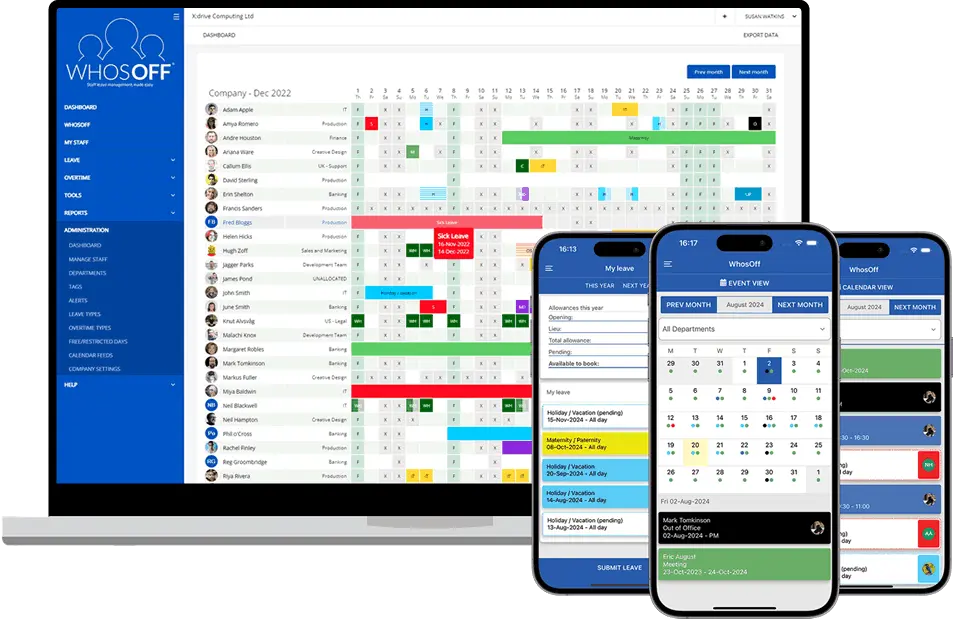
WhosOff is built specifically to manage employee leave and absence, without turning it into a full HR system implementation. Employees submit requests themselves and can see their own remaining allowance. Managers review requests against the full team calendar in one place, rather than switching between email, a spreadsheet and Outlook to piece the picture together. Once something's approved, the relevant records update on their own.
It also includes shared team calendars, online leave requests and approvals, multiple approval levels, custom leave types, leave restrictions and policies, holiday allowance tracking, overtime and TOIL, absence reporting and analytics, Bradford Factor reporting, mobile apps, Outlook and Google Calendar integration, Microsoft Teams and Slack integration, an API, and webhooks to connect to any workflow software you already use.
None of that means abandoning what your team already uses. Employees can carry on working in Outlook and Teams as normal, while WhosOff handles the actual leave process underneath.
Frequently asked questions
Is Excel good enough for managing annual leave?
Can Outlook be used as a staff holiday calendar?
Is leave management software better than Excel?
Can leave management software integrate with Outlook?
Can I use Outlook and leave management software together?
What happens to our spreadsheets if we move to leave management software?
How do we know we've outgrown our holiday spreadsheet?
Use the right tool for the job
Spreadsheets aren't bad. Outlook shared calendars aren't bad either and both are genuinely useful tools. The question is whether they're the right tools for managing employee leave specifically, and for a small team with simple requirements, they might well be.
As the organisation grows, the cracks tend to widen: more employees means more requests, more calculations, more clashes, more approvals, and more chances for the records to fall out of sync with reality. That's roughly the point where dedicated leave management software starts to pay for itself, one process connecting the request, the approval, the allowance and the calendar, instead of an email for the request, a spreadsheet for the allowance and Outlook forthe calendar. And if your team wants to keep seeing leave in Outlook, there's no reason to give that up.
🚀 Sound like your business? Make the switch today!
WhosOff manages employee leave properly while still working alongside the tools your business already runs on, so nobody has to juggle a spreadsheet, a calendar and an email thread just to find out who's off next week. Try it free, or book a 20-minute demo and we'll show you how it would work for your team.
👉 Start your FREE WhosOff Trial Book a 20-min Demo


Similar articles
22.SEP.2026
Who's in, who's off, and when are they back? It sounds like a simple question - until sickness, holiday clashes, and a spreadsheet nobody's updated since last week make it anything but. Here's a full UK guide to what absence management software actually does, how it differs from leave management, and the rules worth knowing before you build (or fix) your process.
07.SEP.2026
A spreadsheet is fine when there are five of you. It's less fine when requests are arriving by email, WhatsApp, and sticky note, and nobody's quite sure who's actually off next week. Here's a practical look at why leave admin hits small businesses harder than most, and how to know when it's time for something better than a shared spreadsheet.
24.AUG.2026
Leave management looks simple on paper - until three people request the same week off, your busiest month collides with a holiday rush, and someone resigns with ten days still owed. These situations aren't exceptions; they're what HR actually deals with every week. Here's a practical look at the most common leave scenarios, and how the right process (and the right software) stops each one from becoming a headache.
03.AUG.2026
Office-based leave management is easy - until your team isn't all in one office. Add remote workers, multiple sites, or a genuinely hybrid schedule, and "who's actually off this week?" stops being a simple question. Here's what to look for in leave management software built for distributed teams, and how to stop spreadsheets from quietly falling out of sync.