From time to time you might need to make adjustments to various settings on your WhosOff account that could impact any already booked time off. These could include (but are not limited to) creating additional Free Days, entering Bank Holidays into the system or working time adjustments.
The system won't automatically recalculate any already booked leave requests to ensure that the correct allowance adjustments take place, but don't worry there is a process you can run to ensure that all leave requests affected are correctly adjusted.
Firstly, we would suggest running a report to find out if any leave requests are affected, we'll base the following example on someone changing their work schedule during the end of June 2026
- Login to your WhosOff account
- Click Reports on the left hand menu
- Click on the WhosOff report
- Then, select the following in the Report filtering options:
- Date Range - Date Range
- Start Date - 01/06/2026
- End Date - 31/07/2026
- Leave Type - All Leave Types
- Type - Company
- Group by - Staff Member
- Then click Run
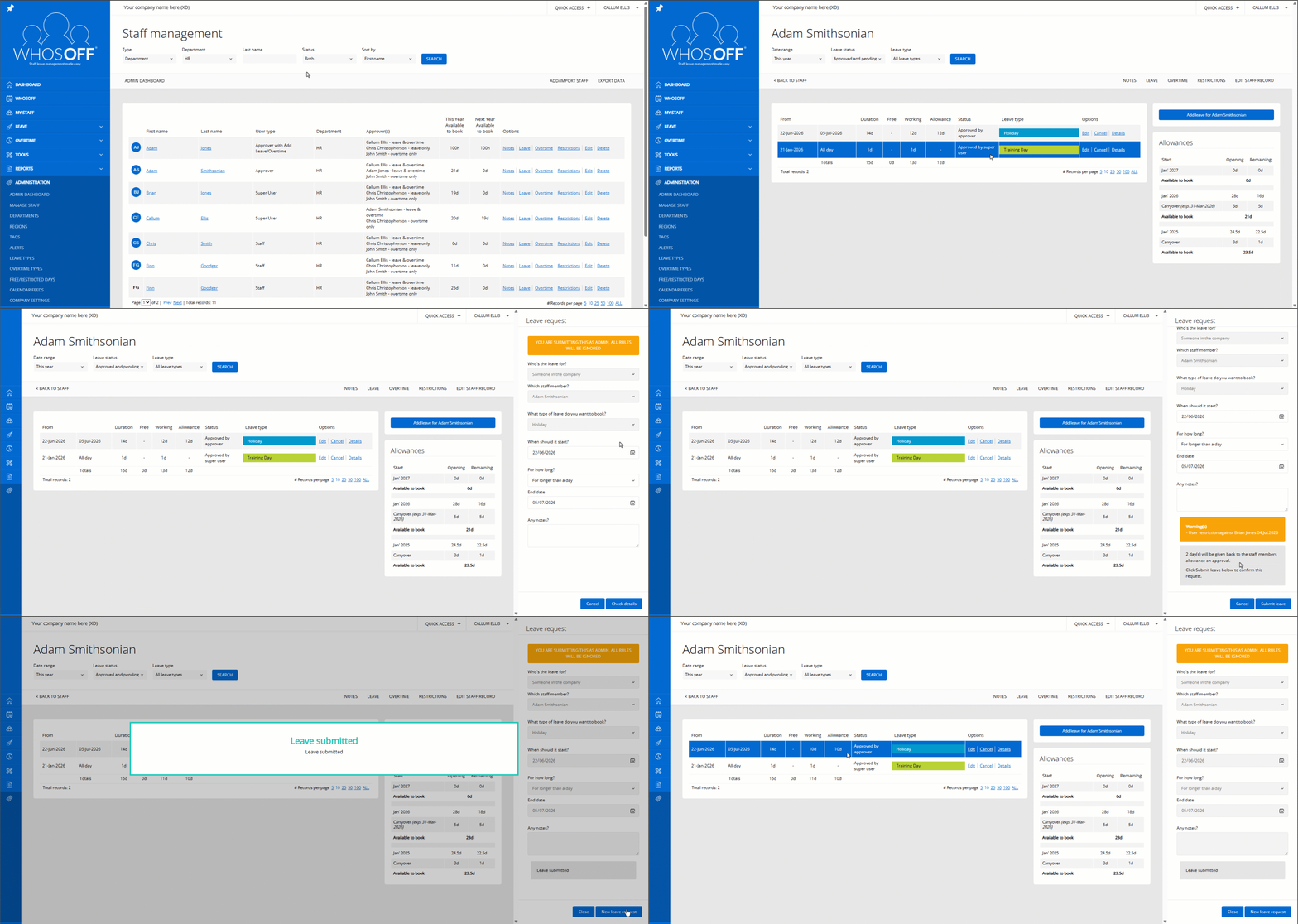
Once you've established which leave requests are affected, you can run the leave update process on each individual affected request(s). To do this:
- Login to your WhosOff account
- Click Administration on the left hand menu
- Click Manage Staff
- In line with the required staff members' name click on Leave
- On the resulting page, you'll see a list of the leave requests for this staff member for This Year by default, you can adjust the year you're looking at if needed
- In line with the required leave request click Edit
- Then on the right hand panel, without making any changes click on Check Details
- Finally click on Submit Leave
This will allow the system to recalculate the leave request and take into account any system changes that could affect allowance deductions.


Similar articles
How to subscribe to a calendar feed in Outlook
Setup and subscribe to your WhosOff calendar using Microsoft Outlook
Introduction to the new WhosOff UI
View our quick introduction to the new WhosOff user interface.
How to subscribe to a calendar feed in Google Calendar
Learn how to setup and subscribe to your WhosOff calendar feed from within your Google Calendar account.
How to subscribe to a calendar feed using Office 365
Find out how to setup and subscribe to your WhosOff calendar through Office 365.
Reset or request a new password
As an added security feature, WhosOff does not reveal any passwords to any user of the system, irrelevant of their user level. This article explains how to request a new password, and how a super user can reset an employee's password.
How to log in with Google (Social Sign On)
Link your personal or work Gmail to the WhosOff platform for seamless sign on.